This is a guest post from Arunabh Verma, a React Native developer and founder of Powstać who spends most of his time building mobile products with React Native, focusing on performance, interaction design, and the small details that make apps feel polished and intuitive.
Powstać was building a chat application. The chat was already media-friendly: users could attach images, upload files, and share media like they would expect from any modern mobile app.
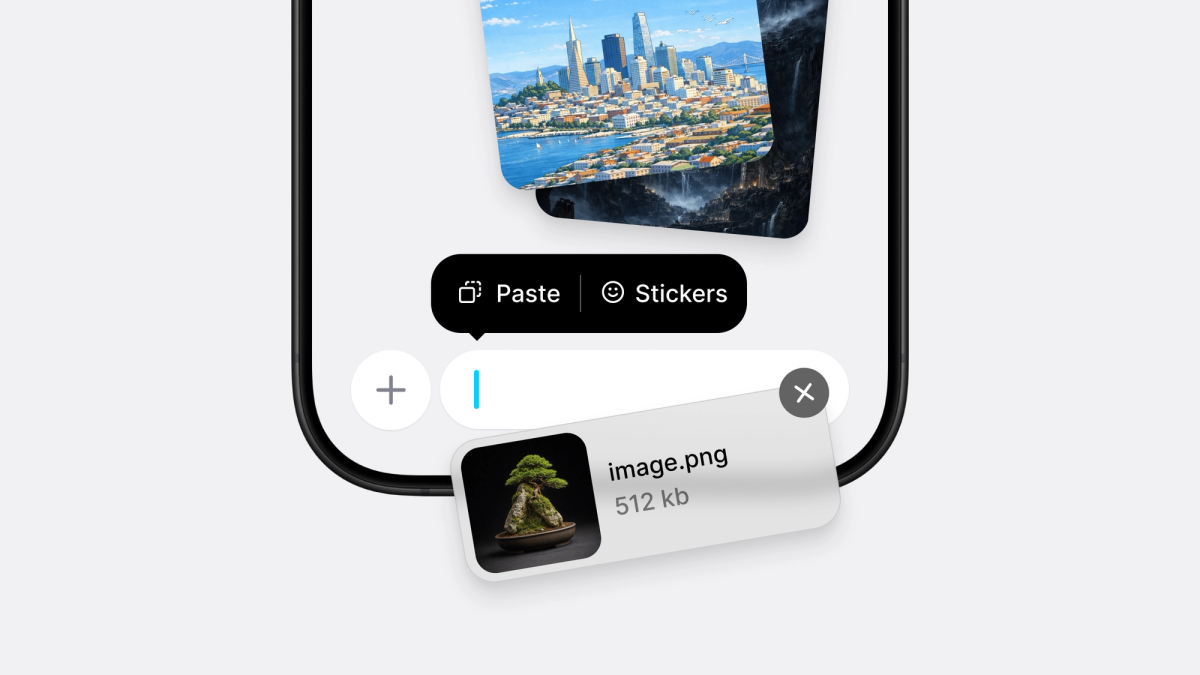
But one tiny interaction was missing: Copy an image, tap the chat input, and paste it.
As a user, this feels obvious. Native apps do it all the time. You copy a screenshot, a meme, a GIF, or an image from another app, paste it into the composer, and it appears as an attachment. No file picker, no extra taps, no ceremony. Just paste.
So I decided to add it.
The existing solution
At first, we used Mattermost's react-native-paste-input, the same library Bluesky was using at the time.
It worked well enough. It supported image pasting on both iOS and Android and solved our immediate problem without requiring us to build native functionality ourselves. For our chat application, the UX improvement was immediate: users could copy an image and paste it directly into the conversation.
It was a tiny feature, but a surprisingly meaningful improvement.
Then we migrated to React Native's New Architecture, and things started breaking.
Not in a clean "one obvious error message" kind of way. The library broke in pieces. Some parts worked, some parts didn't, and some things worked on one platform but failed on the other.
We patched it, then patched it again. Eventually, we managed to keep iOS mostly functional, but Android became increasingly difficult to maintain. The library was not actively evolving for the changes we needed, and every patch felt like another temporary fix.
At some point, I realized we were spending more time working around the solution than benefiting from it.
Building a new input wasn't the answer
Around the same time, Software Mansion was working on richer input capabilities through react-native-enriched. It is a really interesting project and one of the better directions for rich text and rich input experiences in React Native.
I considered adopting it. I also considered building a completely custom input myself.
Then I stopped and thought about what that actually meant.
Building an input sounds simple until you start listing everything a native text input already does:
- text selection
- cursor management
- autofill
- accessibility
- keyboard behavior
- clipboard integration
- IME support
- input accessories
- platform-specific edge cases
That is years of native behavior users already expect. I did not want to build another TextInput. I just wanted paste support.
react-native-enriched was solving a much larger problem. It supports rich content editing and embedded media, which is powerful. But my use case was different.
When a user pastes an image into a chat application, I do not necessarily want that image inserted into the input itself. I want the image file. I want a URI. I want to treat it like an attachment.
That distinction ended up becoming the whole point.
Then I read Fernando Rojo's blog
While researching different approaches, I came across Fernando Rojo's write-up about how the v0 app handled paste functionality.
The idea was beautifully simple: don't rebuild TextInput, wrap it.
That instantly clicked.
Instead of creating a new input component with its own styling rules, API surface, and maintenance burden, a wrapper could sit around a normal React Native TextInput and observe native paste behavior. The application would still own the input, and the wrapper would only add paste intelligence.
That felt right.
The API I wanted
The goal was simple: developers should keep using the normal React Native TextInput, but get a proper onPaste event for media.
The app keeps full control of the input. The library only adds paste intelligence.
No custom editor, no prop mirroring, no special styling system, and no replacing the component developers already trust. Just a wrapper.
iOS
I started with iOS, where the first thing I learned was that clipboard access is surprisingly delicate.
Modern iOS versions may show clipboard privacy prompts if an app inspects clipboard contents too early. That means simply checking the pasteboard every time the user focuses an input can create a terrible experience.
So the wrapper only reads from UIPasteboard after the user explicitly performs a paste action.
Once the paste happens, the native layer inspects the clipboard contents: text, images, GIFs, WebP, HEIC, and anything else useful. If media is detected, the library writes it into temporary files and sends local file URIs back to JavaScript.
The payload stays intentionally small:
That gave me the API I wanted from the beginning: a paste event that lets the app decide what to do next.
Android was much harder
Android's clipboard and content systems are more fragmented than iOS. For Android 12 and above, the proper path is OnReceiveContentListener, which allows native views to receive rich content such as images and media.
But that alone was not enough.
Android also has insertion menus, selection menus, clipboard managers, and multiple paths that can trigger paste behavior. To make the experience reliable, the library also hooks into native paste actions through Android's text editing APIs.
The expected behavior is simple:
- paste text → text appears
- paste image → image becomes an attachment
But making that feel native takes work. If the clipboard contains text, Android should behave normally. The user should not lose standard text input behavior. If the clipboard contains media, the wrapper should intercept it, save the content into cache storage, and emit file URIs back to JavaScript.
That is the difference between a user seeing a broken "Can't paste image" experience and a chat composer that just works.
The edge cases never end
Once the basics worked, the real work started. The first set of edge cases looked straightforward:
- multiple images
- GIFs
- transparent PNGs
- screenshots pasted directly from the system screenshot UI
Each one behaved a little differently.
GIFs needed to remain GIFs instead of accidentally becoming static images. Transparent images needed to remain transparent, so the library preserves PNG output when alpha channels exist and uses JPEG only when appropriate.
Screenshots were another surprise. Images copied from the Photos app behaved differently from screenshots copied directly from the system screenshot UI. The clipboard payloads looked different, the underlying data types were different, and the assumptions I originally made were wrong.
So the implementation became smarter about identifying content types instead of assuming every image arrives through the same pathway.
That is usually where "simple" features become real engineering work.
The feature nobody was handling properly
Then somebody opened an issue asking about iOS stickers.
Even if stickers were not supported yet, they pointed out that the library should at least avoid inserting weird extra characters into the text field. That issue completely changed my understanding of the problem, because they were right.
Most applications do not handle stickers particularly well.
On iOS, stickers are not always exposed like normal images. Newer iOS versions can insert them through text attachments and adaptive image glyphs rather than traditional clipboard image formats.
So the library started watching for:
NSTextAttachmentNSAdaptiveImageGlyphon iOS 18
When sticker content appears, the wrapper extracts the underlying image data, removes unwanted attachment content from the text field, preserves the cursor position, writes the media into temporary storage, and emits a normal image paste event.
Initially, the implementation only supported static stickers. Later, I added animated sticker support as well.
That became one of my favorite parts of the library because it is the kind of feature users simply expect to work. And when it works, nobody notices, which is exactly how good infrastructure should feel.
The result
That project eventually became expo-paste-input. What started as a small production requirement inside a client application turned into a native Expo module supporting:
- text paste
- image paste
- multiple image paste
- GIF paste
- transparent images
- screenshots
- iOS stickers
- animated stickers
All while keeping developers on the standard React Native TextInput they already use. No custom editor, no custom composer, no special rendering pipeline. Just a small wrapper around existing native behavior.
Open source comes from real problems
The interesting thing is that this did not start as an open-source project. It started as a problem inside a client product we were building at Powstać.
That is what made it worth solving properly.
It was not a demo idea, a weekend experiment, or a library built just for the sake of publishing something. It came from a real product, with real users, real platform constraints, and a small interaction that needed to feel native.
We solved it first for the application. Then, once the implementation became more complete, I realized other React Native developers were probably running into the same problem. Open source comes later.
Along the way, I reached out to the Bluesky team because they were using the same Mattermost-based approach we originally used. They were interested in the idea, and I ended up contributing changes that moved the conversation forward there as well.
That is probably my favorite part of React Native: a small problem in one application can eventually become useful for many other developers.
Final thoughts
Paste seems simple, but it is not.
Behind a single Paste button sits clipboard privacy, temporary files, GIF handling, Android content APIs, native text editing systems, image formats, stickers, screenshots, and platform-specific behavior that users never think about.
Which is exactly why it matters. Users should not have to think about any of it. They should just copy something, paste it, and move on.
If you are building a chat application, social platform, notes app, AI application, or any workflow where users frequently share media, give expo-paste-input a try. And if you find an edge case I have not discovered yet, I would love to hear about it.