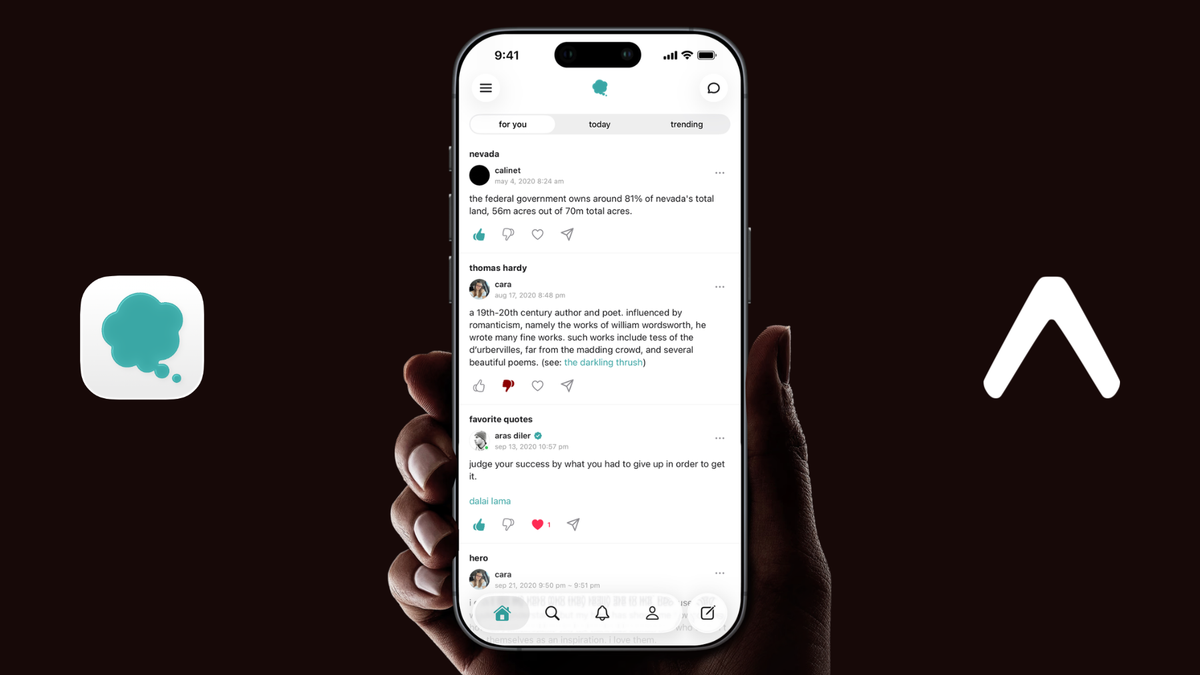
udictio grew from a master’s project into a production social platform with thousands of entries.
Most social posts are built to disappear. They enter a feed, compete for attention, and soon become difficult to find again.
I wanted to build the opposite: a social platform where every contribution remains attached to the thing it is about.
That idea became udictio, a collaborative, social dictionary. A person, film, product, place, event, idea, or feeling can have one permanent topic page. People add independent entries based on their knowledge and experiences, and those entries remain available to the next person who visits.
Entries are chronological by default. Real names are not required. Real names are not required, but every entry can still be reported and removed through moderation. Public follower and vote totals are intentionally hidden, there is no advertising, and an algorithm does not decide which individual post should dominate the experience.
udictio began as my master’s project in the Media Innovation program at the University of Nevada, Reno. I continued building the mobile app for roughly two years before releasing it on the App Store in 2026. It now supports thousands of user-written entries, along with profiles, messaging, notifications, following, moderation, image uploads, voting, favorites, drafts, search, deep links, and a complete authentication flow.
The mobile app never stopped being an Expo project.
The question was not whether Expo would let me avoid native code. It was whether Expo could remain the center of the project while I added native code only where the product genuinely needed it.
The answer was yes.
Expo as the architecture, not just the starting point
udictio uses Expo Router, React Native, TypeScript, Apollo Client, and a Django GraphQL backend. Expo packages handle routing, notifications, images, secure storage, audio, speech, localization, translation, updates, symbols, widgets, SwiftUI controls, glass effects, and many smaller platform details.
When an official package solved the problem, I used it. When an API was too new or specific, I added the smallest native boundary possible:
- a config plugin for reproducible native project changes
- Swift files compiled into the main app target for App Intents
- a focused Expo module for Core Spotlight indexing
The generated ios directory stays out of Git. Expo Prebuild and Continuous Native Generation recreate it locally and on EAS Build, while the app configuration, plugins, and native source remain the source of truth.
I did not want a React Native app and a second, hand-maintained native project slowly drifting apart. I wanted one coherent Expo project whose native output could always be regenerated.
Posting to udictio through Siri without opening the app
The clearest example is udictio’s posting intent.
A user can say, “post an entry in udictio,” provide a topic and the entry text, and receive confirmation from Siri. The interface never appears, and the React Native runtime never starts.
That constraint determined the architecture. A background App Intent cannot assume JavaScript is alive. It must collect parameters, authenticate, perform the request, interpret the result, and return useful feedback entirely in Swift.
The following is simplified to show the flow. The production version includes validation, status-specific errors, strict URL encoding, and additional lifecycle handling.
The intent sends the same GraphQL mutation used by the app, so validation, moderation, rate limits, suspensions, and topic creation still belong to the Django backend.
I also avoided giving Siri the app’s normal session credential. The backend issues a separate, revocable token restricted to creating entries. React Native stores it with expo-secure-store, and Swift reads the same Keychain item. Logout removes it, account ownership is checked locally, and users can disable Siri posting independently.
A lifecycle bug the simulator did not reveal
The most useful App Intents lesson came from a failure on a physical device.
My first implementation started a network request and then displayed a Siri prompt. The simulator accepted that order. On a real iPhone, displaying the dialog suspended the intent and killed the request.
The reliable sequence was:
- collect every missing value
- finish every prompt
- perform the network request
- offer to open the app only after the write completes
The code appeared correct, and the simulator agreed. The device did not.
Keeping App Intents inside the Expo workflow
udictio also exposes intents for opening a topic, reading trending topics, reading topics active today, and opening a topic with its summary ready to run.
Apple’s App Intents metadata extraction did not discover the shortcuts when their Swift files lived inside a pod. They had to be compiled into the main application target.
Because the iOS project is generated, I did not solve that by editing Xcode. I wrote a config plugin that copies the Swift sources into the generated app directory and registers them in the target’s Sources build phase. The plugin is idempotent and runs during local prebuilds and EAS builds.
A Home Screen widget built with expo-widgets
udictio does not revolve around an infinite feed, but it does have a changing list of trending topics. That made the Home Screen a natural place to show what people are writing about at a glance.
The widget supports small, medium, and large families, adapts to light, dark, tinted, and vibrant rendering, and opens udictio with the trending section selected.
I built the interface with expo-widgets and @expo/ui. Expo’s config plugin generates the widget extension and shared App Group during prebuild.
The interesting challenge was not the layout. It was learning to treat the widget as a separate runtime and storage boundary.
The widget function is serialized and evaluated in an isolated JavaScriptCore environment. It cannot freely access arbitrary module state, and some patterns that work in the app runtime do not behave the same way inside the widget. I kept its layout bounded, its dependencies explicit, and its data contract small.
The snapshot data also has to survive property-list storage in the shared App Group. A single unsupported value such as undefined, NaN, or a non-serializable object can prevent the timeline from being persisted.
I added a development readback step to verify what actually reached the shared container instead of assuming an update succeeded. Topic data is pushed immediately, while icons are copied into the App Group in the background and trigger a later refresh.
Expo created the extension target, App Group, native UI bridge, and update mechanism. The application code only needed to respect the lifecycle and serialization rules on the other side.
Summarizing collective knowledge on the device
Some udictio topics contain many independent perspectives. Apple’s Foundation Models framework made it possible to help readers understand that range without sending the entries to a third-party AI service.
I use react-native-apple-llm as the bridge to Apple’s model sessions. Around it, I built the product-specific system: availability checks, filter-aware entry collection, token-budgeted chunking, map-reduce summarization, streaming, cancellation, session disposal, and user-facing error handling.
The summary action appears only when Apple Intelligence is available and a topic contains at least five entries. It summarizes the exact view the reader has selected, including today’s entries, popular entries, image entries, or search results.
Small topics use one model session. Larger topics are split into bounded slices, summarized independently, and reduced into one final result. The prompts reflect udictio’s structure: entries are standalone definitions, observations, anecdotes, and experiences, not necessarily replies in a conversation.
The most important production issue appeared when a user dismissed the summary during generation. A stream interface continued receiving native events after cancellation and attempted to write into a closed stream, causing a crash captured by Sentry.
I switched to an event-emitter path. Each event contains the full response so far, cancellation simply stops UI updates, and late native events become harmless. Every run also creates and disposes its own model session rather than keeping the model resident longer than necessary.
The interface hides that machinery. Readers see a calm “summarizing...” state, an Apple Intelligence-inspired Skia and Reanimated frame effect, and then a concise result with a disclosure that it was generated on-device and may contain inaccuracies.
The goal is not to replace the original entries. It is to help readers decide what they want to explore.
Native details that make the whole app feel coherent
The deepest integrations are App Intents, widgets, and on-device summaries. A few smaller features show how the same Expo-first approach extends across the rest of the product.
Translation: expo-translate-text translates only the text and spoiler portions of an entry. Links, mentions, topic references, images, and formatting remain intact.
Listen: On iOS, entry text is rendered into a cached audio file with Apple’s on-device speech synthesizer and played through expo-audio, enabling background playback and system media controls.
Spotlight: A small Expo module donates recently visited topics to Core Spotlight with a 30-day expiration. Logout clears them because browsing history is personal.
Story sharing: udictio renders a 9:16 entry card that can be sent to Instagram or Facebook Stories, saved as a 1080×1920 image, or shared through the system sheet.
iOS 26 and Liquid Glass: Expo Router supplies native navigation, search, toolbars, and form sheets. @expo/ui adds SwiftUI controls, while expo-glass-effect is used selectively with adaptive material fallbacks on earlier iOS versions.
These features use different Apple frameworks, but remain focused extensions of the same Expo application.
What made the approach sustainable
Three decisions mattered more than any individual API.
Keep the native edges narrow
The Siri layer performs a small set of requests. The Spotlight module indexes and clears topics. The widget receives a compact snapshot. Native code does not become a second version of the product.
Make native changes reproducible
Extensions, entitlements, source files, and build settings belong in app configuration and config plugins, not in undocumented Xcode edits. Prebuild must be able to recreate the project.
Treat fallbacks and binary compatibility as part of the feature
Apple Intelligence is not available everywhere. A story-sharing target can disappear. An icon can fail to download. A newer JavaScript bundle may run on a binary that lacks a recently added module.
udictio guards optional integrations, uses an app-version runtime policy for native changes, and delivers JavaScript-only fixes through a code-signed expo-updates endpoint without forcing a disruptive mid-session reload.
Expo made this scope practical
udictio began as an academic idea about making social knowledge more permanent. It became a production social platform with thousands of entries and a mobile app that reaches into some of the newest parts of iOS.
Expo did not merely help me start quickly. It let the app keep expanding without splitting into disconnected JavaScript and native codebases.
Official packages handled most platform work. Focused Swift filled the real gaps. Continuous Native Generation kept the native projects reproducible, and one Expo project remained the source of truth.
For me, Expo was not a compromise between speed and native capability. It was the architecture that made a mobile product of this scope practical to build and maintain as a solo developer.
Expo can be the foundation of a deeply native app without becoming its ceiling.