This is a guest post from Oskar Kwaśniewski, CTO and co-founder of TesterArmy, where agents test mobile apps, web apps and websites like real users.
…
Leverage EAS workflows to build and run agentic tests on your Expo app in minutes with TesterArmy.
Last week Expo showed what happens when you put an agent inside EAS Workflows: a GitHub issue labelled repro becomes a pull request with a fix and recordings that prove it works. That is the repair half of the story. This post is about the other half, the pull request that has not merged yet, and about what I have started calling agentic CI: a pipeline that decides what to build and what to test for each change, instead of running the same list every time.
When I talk with devs about their development process, I often hear that the problem shifts from writing the code to actually reviewing it and clicking the merge button. Agents can create tons of pull requests, but they are still bottlenecked by the review process and the missing confidence to merge the PR.
Pull requests wait in the queue because nobody has the time to sit down, open the app, and tap through the screen that changed… So the change merges, and the first person to tap through it is a user.
The solution is to use what we call “agentic CI”: imagine an agent that, on every pull request, analyzes the description and diff to deeply understand the changes, then opens the app and clicks through the change like a real user would, leaving you with a recording of how it works and what it does to the app.
What agentic CI means here
CI has always been a fixed list. Every pull request runs the same jobs in the same order, whether it renamed a variable or rewrote onboarding. Agentic CI means the list adapts to each pull request. EAS Workflows builds the app, and reuses the last native build when only JavaScript changed. TesterArmy agent reads the pull request and decides what to tap through on the simulator.
Currently, TesterArmy runs on cloud iOS Simulators and Android emulators, not physical devices (although we are working on adding support for real devices). You can use our agent alongside your existing e2e tests and frameworks.
Part one: an agent writes the workflow
The TesterArmy docs page for Expo EAS has a section called "Instructions for AI agents". It is a prompt. Paste it into the coding agent you already use in the repository, Claude Code, Codex or Cursor, and it does the setup for you: it inspects eas.json and .eas/workflows, adds two build profiles, writes a new workflow file without touching an existing one, and never commits a secret.
The two profiles are the whole requirement on the Expo side. TesterArmy needs an iOS Simulator .app, not an .ipa, and a single Android .apk, not an .aab.
The workflow reads three values from your EAS environment: TESTERARMY_API_KEY, TESTERARMY_PROJECT_ID and TESTERARMY_GROUP_ID. Store the API key as an EAS secret, never as an EXPO_PUBLIC variable. A fourth, TESTERARMY_DYNAMIC_AGENT_ENABLED, is optional and defaults to true.
Before you run it, you need a mobile project in TesterArmy with at least one saved test. Run that test once from the dashboard on an uploaded build, so you know the upload and the flow work before CI depends on them. You can get more information about this in the docs.
Part two: EAS builds the app and reuses what it can
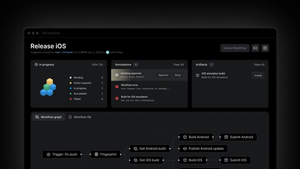
The basic workflow triggers on push to main, on pull requests to main, and on workflow_dispatch. It builds the iOS Simulator app and the Android APK, downloads each artifact with eas/download_build, uploads it to TesterArmy, and runs your saved test group once per platform. Start there. A full native build on every run is slower, but it removes variables while you are wiring things up.
Once it is stable, let EAS skip the native build when it can. Expo's fingerprint job calculates a hash of the native runtime. The get-build job looks for an existing build with that hash. The repack job repackages the app's metadata and JavaScript bundle on top of it without a full native rebuild. When no matching build exists, the workflow falls back to a normal build.
The Android half mirrors this with the APK profile. The upload job runs after whichever of repack or build produced a build_id. One caveat from Expo's own docs: the fingerprint job is for CNG projects. If you commit your android or ios directories, it will not work, so stay on the basic workflow.
This is the part that keeps the loop short. The native build is the slow step in any EAS workflow, and most pull requests on a mature Expo app touch JavaScript only. With repack, the native build happens once per runtime change, and every other pull request goes straight from repack to upload and test.
Part three: an agent tests what changed
Running regression tests on each PR makes sure that you didn’t break anything that worked before. The new part is the job that runs only on pull requests, against the same uploaded build, and works out its own test plan.
It gathers a deep understanding of the intention behind the pull request by reading files and diff. From that, it writes an ordered list of natural language steps for this change, runs them on the simulator, and posts a GitHub check and a pull request comment. The comment first shows the planned steps as a table, then updates in place with per-step results. Every run has a video.
Two behaviors are worth knowing before you turn this on.
First, a skip judge reads the diffs before anything runs. If the pull request changes nothing a user can see, a docs edit or a config bump, the run is reported as skipped, the check shows "Tests skipped" with the reason, and the job passes. On mobile, the judge decides per platform, so an iOS-only change still tests on iOS while the Android run is skipped. Once the judge decides to test, the run always executes.
Second, a real failure fails the EAS job, but the GitHub check is advisory by default. Failed runs conclude neutral, and GitHub counts neutral as passing. If you want a failed test to block the merge, turn on "Block merges on failed tests" in the project's PR Testing tab and mark the "TesterArmy / Exploration Test" check as required in your branch protection.
Close the loop with your coding agent
If Claude Code, Cursor or Codex writes your pull requests, you can make every one of them arrive planner-ready. Add the excerpt from the docs to AGENTS.md or CLAUDE.md once. From then on each pull request description ends with a testing-instructions section the agent can execute.
That is the loop. A coding agent writes the change and the instructions. EAS builds or repacks. A testing agent plans from the instructions and the diff, taps through the app, and leaves a video on the pull request. No need to write a test script.
What this looks like at fifty pull requests a day
Juno builds a health assistant for people living with chronic illness, on iOS and Android, in React Native with Expo. The team is seven people shipping one to two updates a week, which on their side means fifty to a hundred pull requests a day.
Every pull request gets about six TesterArmy runs at roughly five minutes each, on both platforms, covering onboarding, symptom logging, medication, notifications, paywall and account flows. The flows are written as plain-language user journeys, not selectors. In July 2026 the team merged 501 pull requests. In August they merged 791. Marshall Gould, Juno's co-founder and CEO, puts it more bluntly than I would: "We are shipping PRs ten times faster."
Where to start
Start with the example repository. It has the workflow file, both profiles and the dynamic agent job, and it runs as is. When a saved test passes from the dashboard, turn on the dynamic agent, then add fingerprint and repack. Everything else, including the agent prompt and the troubleshooting section, is in the Expo EAS docs.
If it snags on your app, open an issue on the example repository and tell us where.