
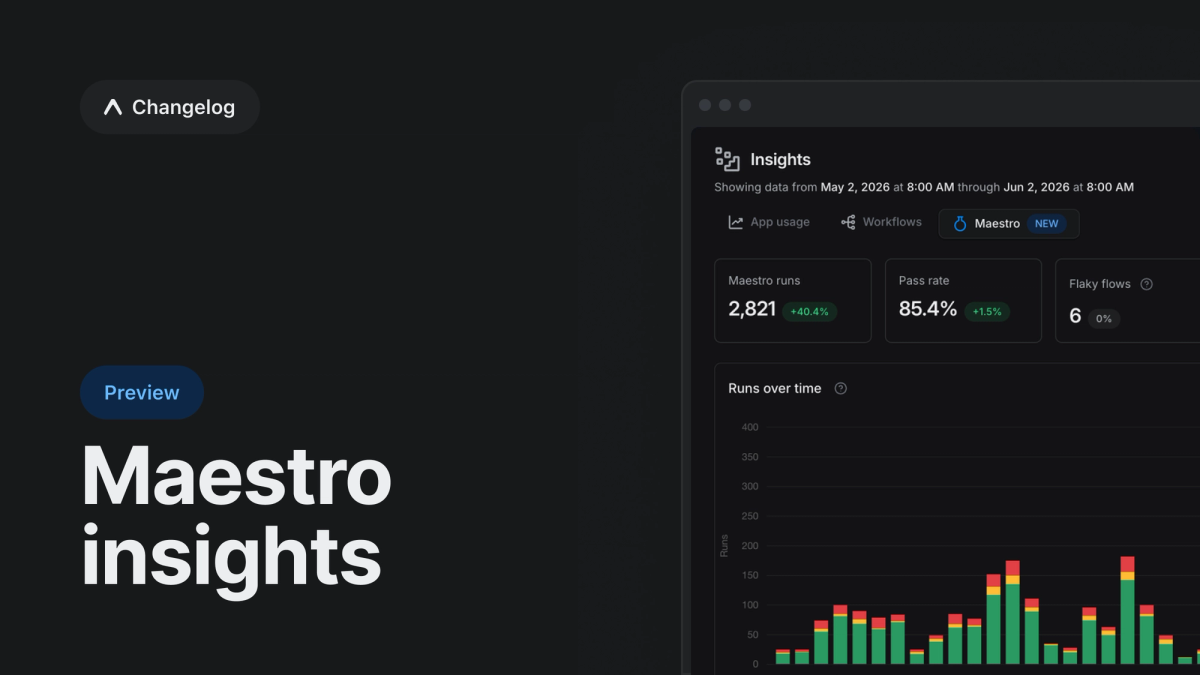
Introducing a new insights dashboard, showing you how every Maestro end-to-end test run performed over time, across your whole team. Identify flakey tests, see when regressions were introduced, and stop scrolling through endless logs.
Your end-to-end tests pass, until they don't. When a Maestro end-to-end (E2E) test fails, acting on it usually means digging through logs to find out what broke, re-running your whole suite to retry one flaky test, and guessing whether things are getting better over time.
Maestro insights
Maestro insights collects and visualizes how your Maestro tests perform over time, right in your project's Insights tab. It surfaces:
- Trends: Maestro runs and pass rate across all your flows over time
- Flaky flows identification: flows that pass only after a retry, so you can find and fix the unreliable ones
- Failure patterns: failures grouped by error message, surfacing common causes behind failures
- Filter by test: open a specific test flow to see its recent runs, durations, and error patterns
With our insights, you can also filter by workflow, Git branch, tag, or status, and sort the flow list by runs, failures, flake rate, or P90 duration to find issues fast.
A clearer view of every run
Every Maestro job now opens with a Test Results summary that lists each flow along with its status (passed, failed, or flaky) and duration. Failed and flaky flows also surface their error messages at the top of the page, so you can immediately see what went wrong without digging through logs. Open the screenshot captured at the moment of failure or jump directly to the failure timestamp in the recording to quickly understand what happened.
Together with improved flaky test detection, these updates make it easier to identify issues, understand failures, and take action faster.
Retries that re-run only failed flows
When a Maestro job retries, it now re-runs only the flows that failed on the previous attempt instead of your whole suite. You’ll get faster feedback and fewer wasted CI minutes. This is the default behavior (retry_failed_only); to re-run every flow on each retry instead, set retry_failed_only: false. See the maestro job reference for details.
Built on JUnit output
Maestro insights, the Test Results summary, and failed-flow-only retries all build on the JUnit report the Maestro job produces by default (output_format: junit). If you've overridden output_format to another value, switch back to junit to use these features.
Get started
Maestro insights is currently available to Production (up to 30 days of history) and Enterprise plan (update to 1 year of history) subscribers. To see your project’s Maestro insights, open the Maestro tab in your project's Insights through the left sidebar. New to E2E testing on EAS? Follow our guide to running Maestro tests in EAS Workflows.