This is a guest post from Andrei Covaciu - a software engineer and AI tinkerer based in Romania. He’s shipped over a dozen mobile apps using Expo and is passionate about building in public and exploring the intersection of code and creativity.
...
Most AI-generated apps never make it past the prototype. I’ve shipped seven to the app store.
Over 90,000 people entered this Bolt.new hackathon. Which is exciting because hackathons are great environments for generating energy and ideas.
But let's be honest here: most projects end in dev mode, preview builds, or a dusty GitHub repo.
This post is for anyone who wants to take an AI-generated app and actually ship it. I’m going to explain how I prompt my way to a real App Store app using AI and Expo.
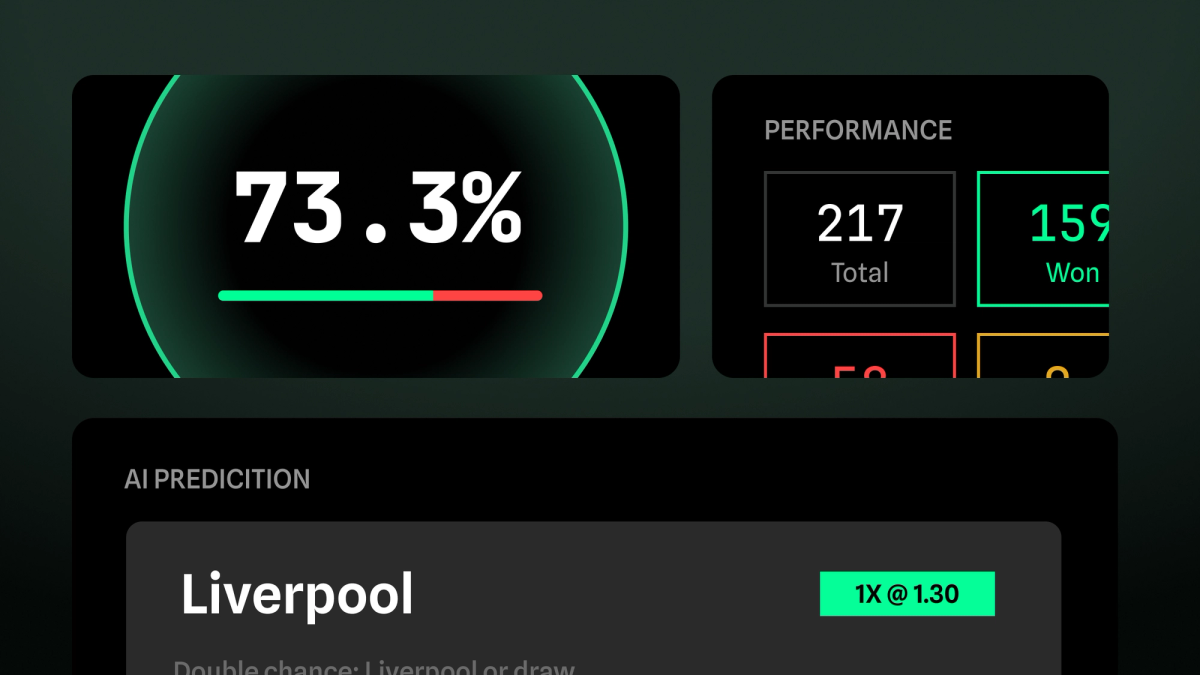
My latest example? BetAI Pro.
Step 1: Come up with the idea
BetAI Pro actually started in the most casual way: me and a friend were watching football one evening, bouncing ideas around, and one of us said, "How cool would it be to get instant predictions for every single game?" Not tips from some sketchy site, but real AI driven insights.
We're both passionate fans who love analyzing matches, and we realized there wasn’t a clean, fast, mobile experience that gave us predictions without all the fluff, paywalls or tipsters, and bookmakers influencing the outcome.
That idea stuck. We knew it could be something more than just a fun experiment.
I decided that I needed to ship it fast. So I started prompting.
Step 2: Prompt the app into existence
Expo is my go-to when it comes to building mobile apps. I’ve been building with Expo for six years and have shipped seven apps to the stores. I leaned on what I know best.
But this one? I wanted to ship it in days, not weeks. So I gave bolt.new a chance to speed up my Expo development.
What your PRD should look like
As I’m a fairly skilled prooompt engineer, I tried to give Bolt the best description that I could for this app.
What can be more descriptive than some simple paragraphs? A PRD, of course.
I quickly generated the PRD with ChatGPT, and then copy pasted (with slight adjustments) into Bolt.
The very first input looks like this:
Product Name: Bet AI
Platform: Mobile (React Native - Expo)
Primary Purpose: Deliver daily AI-generated sports betting predictions in a clear, fast, and intuitive mobile interface.
Business Model: Subscription-based with free trial period.
1. Branding & Tone
- Color palette: Primary – Green (#1F3F2D), White (#FFFFFF), Accent – Soft Gray (#F2F2F2)
- Font style: Clean and modern sans-serif (e.g., Inter / SF Pro)
- Voice/Tone: Confident, data-driven, and accessible. No gambling slang. Focus on insight, not “tips.”
2. Main App Screens
2.1 Splash Screen
- App logo centered
- Dark background
- Fade-in effect
- Auto redirect to login or home (if session exists)
2.2 Authentication
- Login & Signup screen
- Email and password fields
- Option for social login (Apple, Google)
- Buttons: “Log In”, “Sign Up”, “Forgot password?”
2.3 Home – “7 DAYS PREDICTIONS”
- Title: “7 DAYS PREDICTIONS”
- Vertical scroll list of cards, each representing one match
- Card structure:
- League badge & league name (e.g., “Premier League”)
- Match: Team A vs Team B with team logos
- Kick-off time
- AI Predictions:
- Match Winner: [Team Name]
- Win or Draw: [Yes / No]
- Under/Over: [e.g., -2.5]
- Goals Home / Away: [e.g., +1.5]
- Advice: [Full sentence like: “Manchester City or draw and -2.5 goals”]
*Prediction cards have clean spacing, consistent layout and subtle dividers between each item.
2.4 Prediction Details
- When tapping a match card:
- Full prediction breakdown
- Confidence indicator (e.g., progress ring or percentage bar)
- “Why this prediction?” section generated by AI (explanation logic)
- Option to favorite / set reminder
- Lock content if user is unsubscribed
2.5 Subscription Screen
- Title: “Subscribe to Full Access”
- Short list of benefits:
- Daily AI-generated predictions
- Tailored betting advice
- Early access to high-confidence picks
- CTA Button: “Subscribe for €4.99/month”
- Restore Purchases button
- 2-day free trial indicator (e.g., “Try free for 2 days”)
3. User Flows
First-time user:
- Splash screen
- Sign up
- Subscription screen (free trial)
- Access predictions
Returning user:
- Splash screen → Auto-login
- Home → See today’s matches
- Tap match → View detail
- Subscribe if not active
4. Navigation
- Bottom Tab Navigation:
- Home (Predictions)
- Statistics
- Account
5. UX Guidelines
- All prediction data must be scannable in under 5 seconds
- Avoid gambling lingo (no “lock of the day”, “sure tip”, etc.)
- Use AI explanations as educational not emotional (“based on trends”, not “guaranteed winner”)
6. Empty States
- Not subscribed: Blur out details or replace with CTA: “Subscribe to unlock full predictions.”
7. Error/Loading States
- Loading: Skeleton cards with animated shimmer
- Error: “Could not load predictions. Try again later.”
The output? Man it was SPLENDID! But it was not perfect. I felt I could do more.
I read at some point about Brutalism in Web design and I loved it. As I had never seen an app with such a design, I decided to go yolo mode and try it.
So I prompted again. I really didn’t know how to prompt it and ChatGPT didn’t really help at this point, so I gave Bolt some unpolished text. They were just my thoughts, raw, unfiltered.
The output was pure magic.
I iterated through a couple of things: First, I knew what API I was going to use to retrieve football matches. And I knew that I was going to wrap that API into a serverless backend, which would also generate predictions for each game.
I know, being a software developer gives you unfair advantage when using these tools!
So I prompted again: I explained to Bolt what data model/information this mobile app is going to retrieve. I wanted to make it adjust the implementation.
A few minutes later, I HAD EVERYTHING READY FOR EXPORT.
Vibe coding the backend
The app was looking slick but I was still missing the backend. So I downloaded the code from Bolt, pulled it into Cursor, and vibe coded some integrations like:
- the football API.
- Stripe.
- Firebase.
- Expo Push Notifications.
- And some more…
It took only one command to deploy the app with all these integrations. And it was live!
PRO TIP: Use the smartest and most expensive model. Do not try to get cheaper on this. Eventually, even if it’s vibe coding, we don’t want mess in our project. Use the best model that you have available!
Connecting the dots
I asked Bolt to use my serverless backend. I mentioned how I wanted the data to be cached because I wanted to reduce the costs for the AI-generated predictions.
The prompt was fairly simple. In my case, Bolt used an in-memory storage for storing and showing the events. As the implementation was quite generic, I was able to simply prompt Bolt: This is my live API: "https://<firebase-live-api-functions>.com" and this is the response format: "<inserted JSON response format>". Please update the code to use my API instead of the in-memory storage. The data is updated every 24 hours (at midnight), so please cache the data.
Easy peasy, one prompt, one shot, all good and working.
After all of this prompting and iterating I still hadn't run the app locally. I was just looking at it in the preview on the Bolt website and testing it using Expo Go.
And I had already finished 90% of the app. What a time to build a startup… 🤯
Cool cool cool. The next step? Make auth work. Since I wanted to use Firebase Auth, I decided to export the app from Bolt, run it locally and start implementing the authentication on a development build.
Again, this is where being an actual software developer really helps. But if you’re not a software developer you can still simply follow Expo’s documentation to set up authentication on a development build. You need this development build because Bolt is really a sandbox (as is Expo Go). You need to get your code into an actual code editor like Cursor in order to eventually get the code to the app store anyways.
Step 3: Test the app on device
Expo made this part frictionless.
First things first, I made sure that the app starts locally too!
I had already installed node on my Macbook, so:
npm installandnpm run dev
This did the trick! As expected, it worked from the first try.
Next, I installed the Firebase packages that required native modules and triggered a development build using eas. As expected (and HUGE congrats to Expo), everything worked from the first try again!
Once I got it on my device, I followed the auth documentation, which is well written btw, and started to implement Apple Sign-In and Google Sign-In. One hour later, I had everything ready.
The mobile app was incredibly nice. The backend was up and running. The auth and payment systems were live.
So I decided to go live!
Step 4: Get the app ready for production
I cleaned up unused components, folders, and images. I updated app.json with display name, icons, splash screen.
Wait, what? Icons and splash screen?
YES! I generated the logo using ChatGPT and used the given Figma template from Expo to create the actual assets. So easy!
Then came the Apple side:
- Set up App Store Connect metadata (descriptions, keywords, screenshots (yes, generated as well!))
- Made sure the app complied with App Store rules (no gambling, just advice!)
Step 5: Run npx testflight
Of course I used this command: npx testflight. It’s a great one-line command to build, sign, and submit your iOS app to TestFlight. The production build shipped to Testflight in minutes (non devs cannot possibly understand how amazing this is).
But there is a side story as well you should know about: While Expo is making everything working so fast, Apple can slow you down. BetAI got rejected 7 times! More on this below 🤦🏽♂️. For the general picture, here's why AI-built apps get flagged in review.
I was very happy to be able to address the Apple issues fast by simply pushing OTA updates.eas update is a such game changer. I highly recommend it!
From first prompt to App Store approval
It took two weeks and seven Apple rejections. But giving up is not in our blood, brothers.
It’s funny. I built everything in under 3 days. But it took two weeks to get the approval.
AND NOW IT’S LIVE!
I built in public, and couple of hours later, BOOM, the first payment. A subscription activated not for a month, but for three months! Wahhh such a good feeling!
Reflections and tips for other builders
Pro tips:
- Give Bolt a good PRD. You’ll finish the product faster.
- Use Expo + EAS. Local dev + eas builds + OTA updates = BIG WIN.
- Have fun and ship it!
You will feel incredibly motivated once the app is real. Not just running locally, but live, installable, and screenshot-worthy.
If you're building with Bolt and Expo, your app can be real.
AI can generate ideas and code. Expo helps you ship. The only missing piece is your decision to go all the way.
So prompt it. Test it. Tweak it. Ship it. LET’S GOOOO!