This is a guest post from Simon Grimm, creator of Galaxies.dev, where Simon helps developers learn React Native through fast-paced courses and personal support.
…
Working with databases in mobile apps has always been a challenge. While SQLite is a reliable and lightweight option, its raw interface can feel outdated and cumbersome, especially in modern React Native workflows. Writing raw SQL queries and managing schemas manually is error-prone and time-consuming, leaving many developers searching for a better solution.
That’s where Expo SQLite and Drizzle come in.
By combining the flexibility of SQLite with the type safety and developer-friendly abstractions of Drizzle, you can drastically simplify your database management process without sacrificing performance or control.
In this blog post, we’ll walk you through the essential steps to integrate Expo SQLite and Drizzle into your React Native project, use migrations and queries, and even debug your app with a special Expo Dev Tool Plugin!
Setting Up Expo SQLite and Drizzle
Getting started with Expo SQLite and Drizzle is surprisingly straightforward.
After creating your Expo project, you can install the required packages and dependencies:
While drizzle-orm is the main package, the other packages will help us to generate migrations, import SQL files and finally help us debug our database.
As described by Drizzle, you need to customize the metro.config.js and babel.config.js in order to load SQL files later.
Once that’s done, create a drizzle.config.ts at the root of your project that looks like this:
Now you can write your database schema in a new /db/schema.ts file and generate migrations with a script.
For example, you could define two tables with a foreign key relation:
See how this is a lot cleaner, safer, and simpler than pure SQL statements?
With the previously installed drizzle-kit we can now generate our migrations files by running:
This will generate some files in a /drizzle folder, or the output you defined in the config before.
Now we can wrap the SQLiteProvider from expo-sqlite around our app in the _layout.tsx, and we can even use Suspense to make sure our database is ready before the rest of our app loads!
Applying our migrations is now as easy as calling useMigrations, and your SQLite database is set up and initialized!
Type-Safe and Clean Queries
Creating a database schema already felt satisfying, but wait until you see the queries! This is where Drizzle really shines, and it works right out of the box with Expo.
All you have to do is access your database (which you can easily do with the useSQLiteContext hook!), and then pass it to Drizzle like this in your component:
Note: I added the schema of our database as second param here because I previously encountered some typing issues. It certainly won’t hurt!
At this point, you can query your data with Drizzle in different ways. Let’s take a look at some examples.
The first way would be to use a query builder, which feels almost like writing SQL, but in a type-safe way:
While typing, you will notice that you actually work with our schema definition for tasks from before, so there are no table names or strings in here!
You can also write these as easier Drizzle Queries, which are an extension to your schema and the query builder:
If all of that feels too fancy for some of your teammates, there’s always the escape hatch for using raw SQL statements as well:
It may look strange but magical sql operator works just like that!
But hold on, we haven’t even talked about the icing on the cake…
Live Queries!
There is another Expo specific hook called useLiveQuery which will automatically update when your underlying data in SQLite changes.
We already prepared our Expo SQLite provider for this by passing the enableChangeListener to it initially, and now we can use the hook in our component like this:
If you have worked with SQLite in the past and jumped through all the hoops to keep your data updated and in sync, this feels like a fresh wind on a spring morning.
While these are some of the most helpful additions, Drizzle comes with many more features so it’s worth going through their docs to read about all the functions and utils!
Debugging SQLite
No post about SQLite would be complete without talking about debugging which, to be honest, has historically been an absolute pain in the backside.
From using shell commands to figure out the location of the SQLite file on my Mac...to adding a share plugin...and sending a WhatsApp message from my device...I’ve seen everything.
Those days are over.
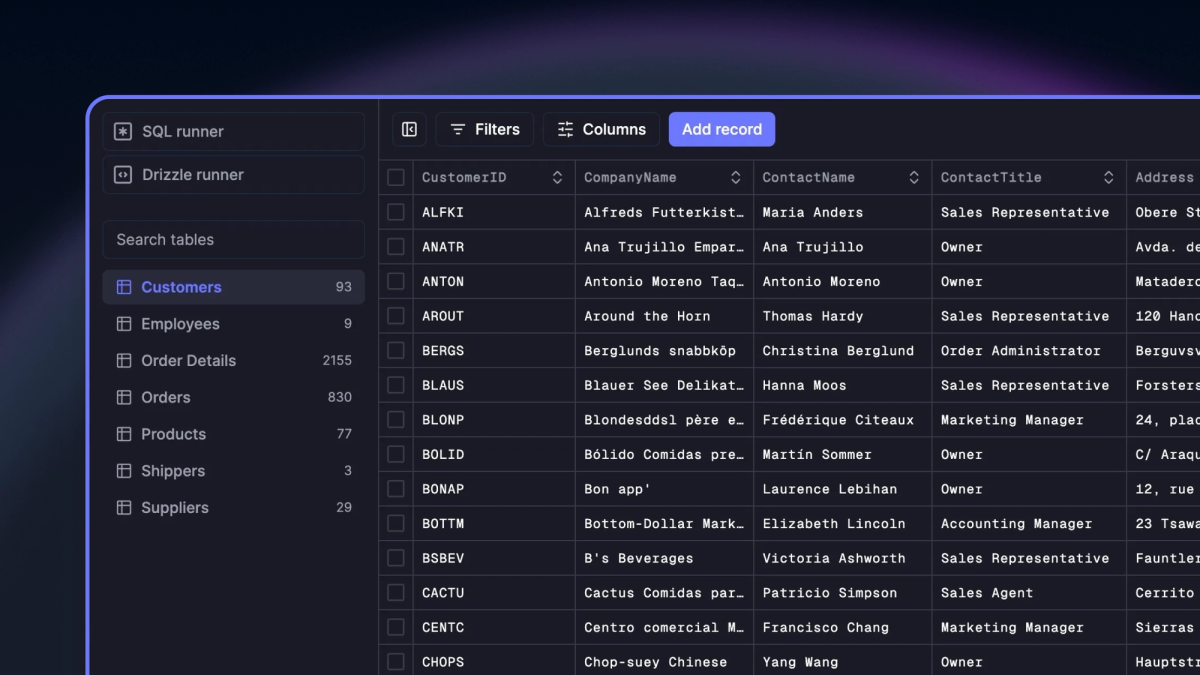
The way to debug your Expo SQLite database with Drizzle is to use the Drizzle Studio Expo dev tool plugin, which is just a simple hook you can add to your component:
Now when you start your app, simply press shift + m in your terminal and select the expo-drizzle-studio-plugin, which will bring up a new browser window that shows Drizzle Studio, directly connected to your SQLite database!
From here, you can directly update your data, add and remove records, or run any arbitrary SQL commands with the SQL runner. You can even export all your data to JSON or CSV.
Compared to everything I’ve used before, this is the easiest way to debug your React Native SQLite database.
Wrapping Up
Expo SQLite and Drizzle can make working with SQLite in React Native cleaner, simpler, and much more enjoyable.
From setting up the database to writing type-safe queries, this combo is a great way to modernize your data workflow.
If you found this quick introduction helpful, explore a full project course about Expo SQLite and data management on Galaxies.dev, my online school focused 100% on React Native.
PS: I also showcased the SQLite live queries on my YouTube channel 👇