We are in a new golden age of television, and if you’re like me, you’re probably overwhelmed with the dozen-plus shows you’re watching all at once. At the same time, you’re craving conversation with others about the episode you just watched, but terrified of running into spoilers on Twitter.
Enter Marathon: the social platform built for TV lovers. Marathon lets you to track all of your shows and follow friends to see what they’re watching. When you finish watching an episode, you're prompted to write a review, read other members' thoughts on a discussion page, or check out the show's stats.
The social platform is an optional community, as many people also use the app as a simple television tracker. You can easily organize shows by currently watching, paused, or stopped, and you can even track each rewatch. Marathon is meant to be a home for all things TV, and users are able to cater their experience to fit their unique television-watching preferences.
Your users will help you grow
We’ve gained a lot of popularity over the past two years — we now process over 50,000 episodes watched every day! Part of this is from our own marketing and app promotions, but a lot of it is from our users sharing their love for Marathon online and with their friends and family.
Users are arguably your most important marketing asset: they validate your app concept, give you feedback on how to improve, and have an infinitely wide reach.
While indie developers shouldn’t neglect running their own app promotions, it’s equally important to enable your users to promote for you. There should be an easy way for users to share important moments in their app journey with others on social media. This in turn will entice their followers to join your app and continue the cycle. You might even reach the right people and hit viral growth!
I approached organic sharing in Marathon with three simple steps:
- Tie your content to a shareable URL
- Equip your users with attractive and eye-catching images
- Target specific platforms to optimize for
Organic sharing with shareable links
Our first step to enable organic sharing was to build shareable URLs that users could post anywhere.
Thankfully, Expo Router makes this very easy. In our native app, each type of content (shows, seasons, episodes, etc.) is presented as its own route. With this in mind, I created a function getShareUrl that accepts our API data and constructs the unique URL to pass to the native share sheet.
When another user opens the shared link, Expo Router parses the URL path and navigates them to the right route.
However, we also need to handle cases where someone opens the link and doesn’t have Marathon already installed. For an MVP, we set up a small site at marathontv.app that mirrored our native app routes. For each page, we pull just enough data from our API to display a title, image, and some download links to our iOS and Android apps.
Another option would be to deploy your native app to the web with Expo and React Native Web (this is what Bluesky does!). You’ll be able to deliver all the same functionality and links to web users without needing to rewrite your app twice.
Generate share images for quality social sharing assets
Users will typically reach for the screenshot shortcut if they want to share an image from your app; however, screenshots aren’t always the best representation of the data they’re trying to share. By providing users with your own share images, you have the opportunity to frame and focus on the exact content you'd like to be shared about your app.
Generating images in React Native is incredibly easily with the react-native-view-shot library. The package lets you capture a “screenshot” of your native components and save the data to a temporary file or as base64.
To make it that much easier: the component doesn’t even have to be on-screen to be captured!
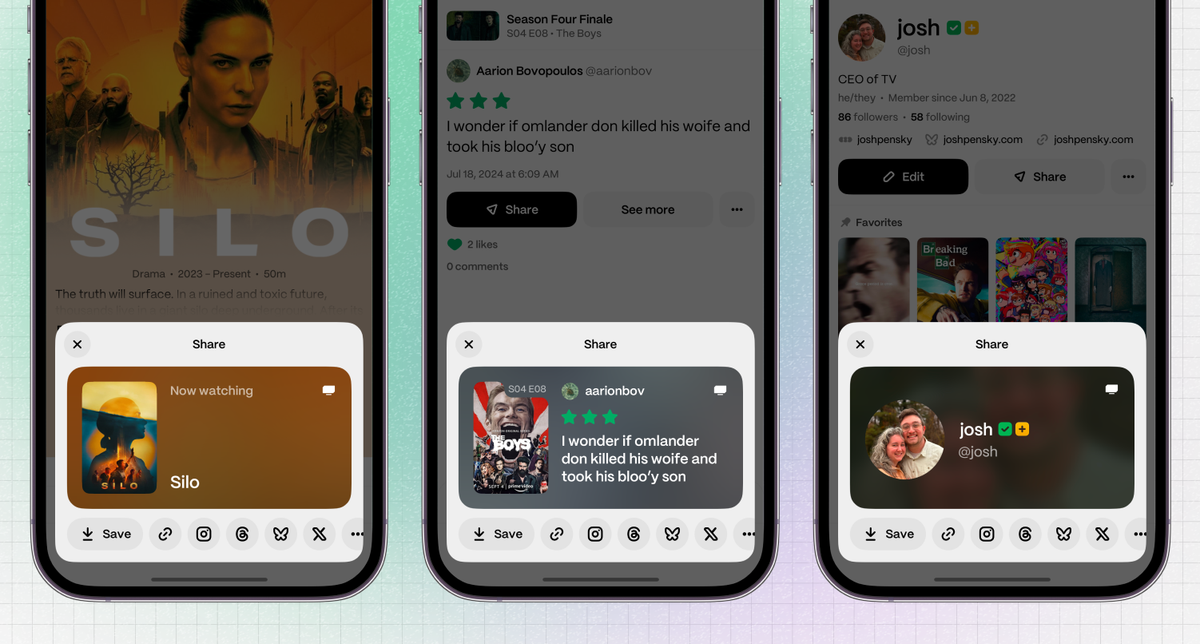
When approaching share images, it was important to me to have a different design for each type of data, in order to easily and quickly differentiate between content. This led to a series of __ShareImage components that would each handle rendering the unique image design. I made sure to build these image components at the size I wanted the final image to be; for example, the image below is set to strictly render at 600 by 300px:
The next step is to present the share image to the user so they can see the final product before downloading and sharing to their socials. One way to do this is to use react-native-view-shot to capture the component off-screen and pass the generated base64 data URI to an Image component:
Share intents for easy social sharing
The final step is to provide users with a way to easily share links and images. We could have used a native share sheet here, but unfortunately those are limited to sharing either text or images, not both. To enable more advanced sharing, we need to build a custom share sheet.
Sifting through user feedback, I decided to focus on a few of the most popular platforms to promote in our share sheet: Instagram Stories, X (Twitter), Threads, and Bluesky.
X, Threads, and Bluesky all handle sharing similarly. Each platform has a post intent URL that we can pass query params, like text, to populate their posting form. For Bluesky, that ended up looking like this:
Instagram Stories is a bit trickier. Unlike Bluesky, Instagram doesn’t have a web intent URL we can hit since Instagram relies on native intents for sharing. Luckily, the React Native open-source community is vast, and there’s a package called react-native-share that handles the native functionality for us.
Stickers give Instagram users the most flexibility when sharing images since they can be moved, rotated, and resized. Sharing a sticker is as easy as generating a base64 data URI from our view shot setup and passing it to the package’s shareSingle method:
Lastly, it’s important to add a fallback share option in case the user doesn’t want to use any of our designated platforms. I opted to add three extra buttons: one to save the share image, one to copy the share URL, and one that opens the native share sheet.
More user experience enhancements to come
We now have a fully working share sheet with custom URLs, eye-catching images, and direct integrations to popular social media. From here, there are a few next steps we can take to further improve the user experience:
- Automatically open our custom share sheet when the user takes a screenshot. This increases visibility of the share sheet and pushes your users to use it next time. We can add a listener to detect the screenshot shortcut using expo-screen-capture.
- Add customization options to your share images. You can either create light and dark mode options, go the Spotify route with different colorways, or add different variants for each share image.
- Capture analytics for how users are sharing on your app. This will give you insight into which content types users are sharing most frequently and what social media platform users are sharing their content to.
The React Native community has been instrumental in helping me build Marathon into the platform that it is today, and I'm so thankful for Expo granting me the opportunity to give back. If you’re a fan of TV, I definitely recommend checking out Marathon and seeing what our community is watching. I can’t wait to see what you build!