In 2020 I wrote one of my first blogs on testing in which I said, “I’m loving my tests the most when they’re failing”. Fast forward a few years, and while our tools have evolved, our mindset? Not so much.
We still love the idea of testing, yet we procrastinate, pick the wrong tools for the job, or test things that don’t really matter—sometimes wasting more time than we save. But at the end of the day, we all just want one thing: to ship with confidence (because if we don’t test it properly, our users definitely will).
This article is here to help—guiding you through building a solid test harness and, more importantly, developing habits that make testing a safety net rather than a chore.
“I still love my tests the most when they’re failing.”
I mumble to myself when a test fails when it's actually suppose to fail, huzzah!
The Good Ol’ Testing Pyramid
The good ol’ testing pyramid: Understanding the (cake?) layers
Imagine testing as a layered pyramid (because, unfortunately, cake doesn’t scale well). At the base, we have static analysis and unit tests—quick, cheap, and designed to catch issues early by focusing on isolated functions. These tests ensure that individual pieces of logic work as expected, making them a solid first line of defense. But while unit tests are great for verifying business logic (like checking whether a user is eligible to unlock a car in a car-sharing app), they don’t tell you if everything works together—and that’s where things get tricky.
Moving up the pyramid, integration tests check whether different parts of your app interact correctly. This is the sweet spot: they provide meaningful coverage without the excessive cost of full end-to-end (E2E) tests. After all, it doesn’t matter if the booking screen correctly displays a car selection component if the payment step breaks when no default payment method is set. By testing at the integration level—starting at the screen or page level when possible—you validate real-world interactions while reducing the need for redundant unit tests.
At the top, E2E tests simulate actual user flows, like a new user going through the onboarding process, testing both happy paths (successful signup and first booking) and sad paths (entering invalid payment details or failing ID verification). These tests offer the highest confidence but come at a steep price in terms of runtime and maintenance.
And finally, manual QA serves as the last safety net before release. Some scenarios simply can’t be fully automated—like physically testing Bluetooth car unlocking or verifying a user’s identity through a custom KYC flow that requires capturing actual photos of a driver’s license.
How to build a solid test harness: Start small, test smart, and grow with confidence
Building your test harness doesn’t have to feel like diving into the deep end without a floaty. Start with the essentials: focus on the parts of your app where users interact, as this mirrors their real-life experience. Begin at the bottom of the testing pyramid to ensure your app’s structure is solid. Start with static tests—make sure your TypeScript types are error-free and your ESLint config can catch any nasty issues early.
Next, tackle smaller, isolated utilities. For example, at MyWheels, this could be a function that checks if the lights of the car are off when the user attempts to finish their trip. While this might seem like a small detail, it’s crucial for the app’s reliability. This is where unit tests come in—by testing this utility, you can ensure the app’s core logic works as expected before moving on.
Once you’ve got the basics covered, shift to integration tests. Start small, like with the account management screen, ensuring users can log in and update their information. Then, test the screen that shows available cars (or other products, depending on your app). Verify that users see the correct products available. This ensures the different parts of your app interact as expected.
These are the parts your users directly interact with, so it’s crucial to ensure they run smoothly. When bugs pop up, ask yourself: can this be automated? If the answer is yes, don’t hesitate—turn it into a test. If you write the test before addressing the bug, that’s TDD (Test Driven Development), and if you do it after, we call it BDD (Behavior Driven Development). Both TDD and BDD are valid approaches—find the one that works best for you.
By testing as you go—starting with the user-facing features, then testing the core logic, and moving up to integration—you’re gradually building a test harness. It doesn’t need to be perfect from the start; just begin small and grow your tests as your app grows. Later on, you can introduce E2E tests and manual QA only when necessary, but remember, automation can save you time and reduce costs compared to manual testing.
Establishing atomic habits for a strong testing culture
Now that you've started building your test harness, it’s time to establish some atomic habits that will keep your testing practices strong and consistent. Begin by taking inventory of what needs to happen—focus on Phase 1: getting the basics right. Make sure you’re solidifying your core testing foundations before diving into more complex stuff.
Awareness is key. Share your testing approach (maybe even this blog?) with your team to advocate for automated testing. Help non-technical stakeholders understand its benefits—automated tests aren’t just a developer luxury, they’re a business asset. Add a coverage report to your pull requests (PR) so everyone is aware of where your test coverage stands (though remember, overall coverage is not the be-all and end-all).
Incorporate testing into your CI/CD pipeline by enforcing tests to run from the bottom of the pyramid all the way up to E2E tests. It’s common practice to run E2E tests before a release or nightly on mobile, as they’re more costly to run in CI. This should happen every time a new PR is opened, ensuring that tests are consistently executed and nothing gets overlooked.
Lastly, testing isn’t a one-time thing—it’s an ongoing process. Continuously maintain, rewrite, or remove tests as necessary. Stay critical of what still needs testing and what’s become redundant, and don’t forget to upgrade your libraries to keep your testing environment sharp. Keep the cycle going, and you'll build a robust, automated testing culture that grows with your app.
“We (royal We) weren’t really testing our components in that project/company”
Says the 50th-something candidate in a job interview... here we go again, I think to myself.
Writing tests alongside features, don’t procrastinate
Don’t let your non-technical stakeholders, product owners (PO’s), or colleagues fool you—writing tests is a part of writing that feature or solving that bug. It’s not something to push aside or treat as a separate task. If you integrate testing right from the start, you’ll save yourself headaches down the road. This is where TDD comes in: by writing tests first, you shape the code in a way that’s both functional and future-proof. It’s all about ensuring your app works as expected from the get-go and catching issues early.
Take this example: I was working on a feature in the MyWheels app to display a warning banner for users booking trips during a risky time frame—between midnight and 6 AM. Instead of manually testing or relying on console.log, I wrote a test that drove the development process, adding new cases and ensuring full coverage. After that, it was basically plug and play—just connecting the logic to the UI where it needed to be rendered, and doing so made me gain confidence.
Here’s a simplified snippet of the test we wrote for this feature:
That test didn’t just validate the feature, it also guided the entire development process. But a quick disclaimer: TDD isn’t the one-size-fits-all solution. Depending on the project, and feature you might find that BDD fits your needs better. The key is to find what works for you and your team—don’t force a method if it’s not delivering the results you need!
Striking a Balance: Meaningful Tests Over Quantity
When it comes to tests, think of it like a buffet—you want variety, but not so much that you’re left with a plate piled high with stuff you’ll never eat. Sure, having 887 tests sounds impressive on paper, but trust me, it’s not always the key to success. The goal is to build a test harness that protects your core functionality, not a test “Asylum Straight Jacket” that restricts future development with an overwhelming number of tests. More tests don’t always equal better code. Instead, focus on the meaningful ones—those that protect your app’s most critical functionality, not just fill up your test suite for the sake of it. A bloated test suite won’t make your project more reliable, it’ll just slow you down. So, let’s keep things lean, focused, and smart.
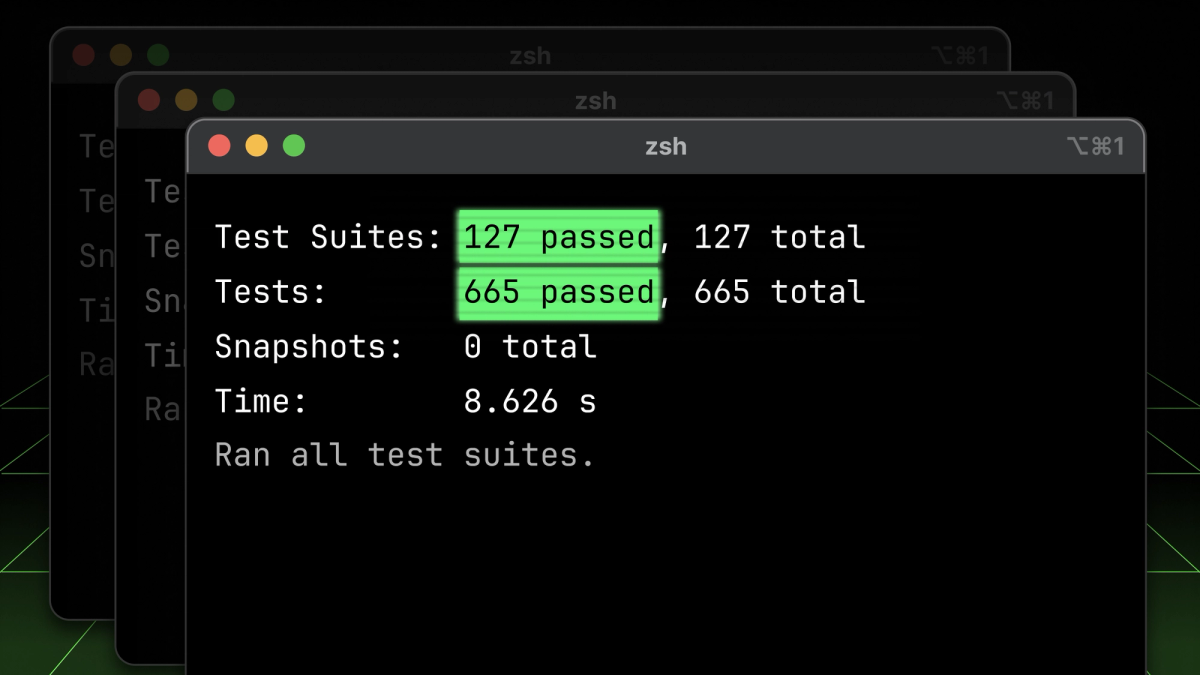
A visual reminder of what too many looks like—184 test suites and 887 tests running on a single project. Talk about overkill!
Common pitfalls & anti-patterns in testing
When it comes to writing effective tests, there are a few classic pitfalls to avoid. Let’s start with over-mocking—it’s tempting to mock everything in sight, but this can create a Narnia-like testing environment where your tests don’t reflect actual user behavior. The more you mock, the more you remove the integration between units, which can lead to passing tests that would fail in reality. Ideally, keep mocks to a minimum—only mock network requests or native modules (e.g., BLE, Camera), and avoid mocking UI or business logic unless absolutely necessary. This way, your tests will stay as close to real-world usage as possible.
Another common issue is losing control of your tests. When your test suite grows too large, and flaky tests start cropping up, it can quickly become overwhelming. It’s easy to let things spiral out of control—tests can start mocking things you don’t remember mocking, and suddenly, it feels like the tests are controlling you, not the other way around. The solution? Take a step back and evaluate the relevance of your tests. Some tests may no longer serve the team’s goals, and it’s perfectly fine to “kill your darlings.” Remove unnecessary tests, and refactor the ones that still matter.
A key anti-pattern to avoid is writing long, unfocused tests. If your tests are bloated with irrelevant details or overly complex, it becomes harder to understand what’s being tested. This often happens when test logic includes unnecessary if-else statements or when the test cases cover too many aspects at once. A good test should follow a clear structure and focus on testing a single behavior. The “Arrange, Act, Assert” pattern is a great approach here:
- Arrange: Set up the initial state, including mocks or data.
- Act: Trigger the behavior or action you want to test.
- Assert: Verify that the expected outcome occurred.
Always write tests with a clear, human-readable title that tells you exactly what’s being tested. For example, use the following:
This ensures that your tests are easier to follow and maintain. Avoid unnecessary boilerplate and break down long tests into smaller, manageable chunks to keep them focused and clear.
Lastly, don’t forget about DRY (Don't Repeat Yourself)—even in your tests. Use custom render functions with RNTL to avoid repetition and make your tests cleaner and more maintainable. And when you have multiple test cases with similar logic, leverage .each to loop over them. A little DRY principle goes a long way, even in testing!
"You should very rarely have to change tests when you refactor code."
-The Ultimate Code Whisperer, Master of the Testiverse
User behavior vs. implementation details
When writing tests, it’s crucial to focus on user behavior rather than getting bogged down in the internal implementation details of your code. It’s tempting to write tests that cover every tiny aspect of the implementation, especially when enforcing code coverage, but that approach doesn’t always serve the app’s real-world use. Instead, prioritize tests that validate what the user sees and interacts with. After all, users don’t care about what's happening under the hood of the app- the internal state of components—they care about whether the UI responds as expected, whether buttons click, and whether the app behaves as they’d expect.
If you find that refactoring your code causes tests to fail due to small internal changes, you’re probably testing implementation details rather than user flows. Additionally, avoid writing tests for issues that could be caught by static code analysis tools (Remember TypeScript and Eslint for instances). As Kent C. Dodds wisely puts it, don’t write tests for things that don’t matter to the user—test the behavior that the user experiences. Keep your focus on the high-level functionality to ensure meaningful and maintainable tests.
Does size matter? Ehm, I mean, code coverage?
Ah, the age-old question: Does code coverage matter? As my Austrian mother-in-law always says: “Jein” (Pronounced like “Yine” a wonderful mix of Joa & Nein, or yes & no in one word).
Let’s not get too caught up here—just because your code coverage is a solid 80% doesn’t mean you’ve totally nailed it. That 20% you’re skipping? It could be the beating heart of your business logic, and if you’re just chasing numbers, you might miss the really important stuff.
Instead of stressing over arbitrary percentages, focus on what really counts: testing your core functionality and user flows. Tools like Codecov, SonarCloud can help set up a solid quality gate in your PRs and provide useful insights. And don't forget to lint those merge requests with Danger JS to catch any sneaky issues before they slip through. Code coverage is a helpful metric, sure—but it's just one piece of the puzzle. Quality over quantity—remember, it’s not about the size of the coverage, it’s about how you use it!
Where to locate your tests
Ah, the eternal debate—where should you stash your test files? Right next to your code (1), neatly tucked away in a nearby __tests__ folder (2), or exiled to a global __tests__/ directory at the root of your project (3)? Each approach has its quirks. Keeping tests next to components is like having snacks within arm’s reach—convenient and encouraging. Storing them in a __tests__ folder feels tidier, like organizing things into labeled bins (though remembering what’s inside can be a challenge). And the global __tests__/ directory? That’s like keeping your kitchen in one room and your fridge in another—not always ideal, but sometimes necessary for large-scale projects. At MyWheels, we prefer co-locating tests because it keeps everything visible and easy to maintain. But hey, no judgment—choose whatever keeps you (and your team) sane!
Embracing automation & emerging tools
As software development continues to evolve, embracing automation at every level of testing is crucial to maintaining top-notch quality while boosting efficiency. The testing pyramid, which we chatted about in the previous chapter, introduces a layered approach to testing. It starts with static and unit tests, followed by integration tests, and rounds off with end-to-end (E2E) tests. Each layer plays a unique role, and using the right tools is key to executing them effectively.
Static Testing - Static analysis is like the superhero of building a solid testing strategy. TypeScript (TS) swoops in to catch errors early with static type checking (did you know the Reanimated library added it back in 2020? Pretty mind-blowing!). eslint is there to enforce coding standards and catch common mistakes. Meanwhile, Knip steps in to keep your codebase lean by identifying unused modules, and Danger.js automates pull request checks, ensuring consistency and quality.
- TypeScript (TS) - Detects issues early with static type checking. More info.
- eslint - Enforces coding standards and spots common mistakes. Learn more.
- Knip - Finds unused modules to keep your codebase clean. Check it out.
- Danger.js - Automates PR checks for consistent formatting and quality. Read more.
Unit Testing - Unit testing with TypeScript (TS) is a breeze thanks to Jest, a widely used and well-supported tool for React Native projects. It provides an easy way to test isolated components or functions. While Vitest has been making waves and offers similar features, it’s still not fully compatible with React Native Testing Library—so keep that in mind when thinking about it for your React Native projects. For now, Jest remains the go-to for stable unit testing in TS.
- Jest - The go-to tool for unit testing in TS, perfect for isolated logic testing. Getting Started.
- Vitest - A fast, modern testing framework with great features, but still not fully compatible with React Native Testing Library. More info.
Integration Testing - For integration testing in React Native, the React Native Testing Library (RNTL) is your best friend. It gives you all the tools to render and interact with your components. And when it comes to testing hooks, the React Hooks Testing Library makes it a walk in the park. RNTL has quickly become a go-to tool for validating how components work together as expected.
When it comes to testing navigation, Expo Router shines with a stellar API, including the renderRouter function and handy Jest matchers that make testing navigation flows smooth and easy. The RNTL cookbook is packed with best practices, tips, and pre-made recipes that guide you through writing efficient tests, and it even gives you a guide on how to query your components.
- React Native Testing Library (RNTL) - A must-have for rendering and interacting with React Native components. RNTL Documentation
- React Hooks Testing Library - Makes testing React hooks in isolation a breeze. Documentation
- Expo Router - Provides an API for testing navigation flows with
renderRouterand Jest matchers. API Reference - RNTL Cookbook - A treasure trove of best practices, tips, and example tests. Cookbook
- How to Query in RNTL - Learn the best ways to query components during tests. Query Guide
End-to-End (E2E) testing
When it comes to E2E testing, Maestro really steals the show with its user-friendly interface and great developer experience (DevX). Thanks to Maestro Studio, you can have your non-technical PO’s easily click through the app, while Maestro does all the hard work by automatically recording their actions. Then, just add some assertions to make sure key app functionalities are working like a charm.
Keep your tests short, sweet, and focused on key user flows. For instance, in our MyWheels' car-sharing app, the core test flows look something like this:
Once created, run these tests nightly using CI/CD via Expo App Services (EAS), and monitor them for flakiness. Address issues as they come up, and ensure everything passes before shipping to production.
- Maestro - An intuitive tool for E2E testing that records user flows and adds assertions. Getting Started Guide
- Expo App Services (EAS) - Integrate E2E tests into your CI/CD pipeline with EAS for seamless testing. How to Run E2E tests on EAS Build - EAS Docs
Manual QA- When it comes to quality assurance (QA), if it's not automated in your CI pipeline—like static, unit, integration, and E2E tests—then it essentially doesn’t exist. While having an old-school Excel sheet with a test plan is a good start, it’s expensive to execute and not scalable. Traditionally, QA testing is done by your dedicated QA tester or even by your product owner, but this becomes impractical as your team grows. Relying on manual testing alone is neither efficient nor future-proof, and as your development process scales, you’ll eventually hit a wall. Automating tests to catch regressions and ensure quality is essential for long-term success.
Testing in the Age of AI- The testing landscape is evolving, and AI tools are now stepping in to help streamline the process. Tools like ChatGPT or apps such as Unit Test Buddy can assist you in generating meaningful, simple tests faster than ever before. These AI-powered tools can help generate unit tests and assist with creating various test scenarios, saving time and ensuring that your code remains well-covered without requiring constant manual intervention.
Summary of testing philosophy
So there you have it! Hopefully, this deep dive into testing has given you some food for thought and maybe even sparked a little testing fire in your belly. Remember, it's not about having the most tests, it's about having the right tests. Start small, build smart, and keep testing as you go. And don't forget, we're all in this together (community, right?) – so share your testing wins (and failures!) and let's build a better, more tested world, one line of code at a time.
Want to see all this in action? I've put together a repo on GitHub. Check it out and let me know what you think! Happy testing!