This is a guest post from Chitraksh Tarun - a software developer currently working as a SWE Intern @ ClubzFM. He is also a Minecraft Speedrunner, speedrunning the game since April 2021, and the maintainer of the PaceMan.gg mobile app.
...
The Minecraft Speedrunning community moves fast. Like, blazingly fast. With speedruns happening all around the world at any moment, the community likes to stay up to date with potential record breaking speedruns as they happen live.
PaceMan.gg is a community-driven tool designed to track active Minecraft speedruns. It highlights ongoing speedruns and delivers live progression updates through a real-time leaderboard.
The mobile app for PaceMan.gg is built with the Expo SDK, delivering real-time speedrun updates through a mobile interface. We recently added push notifications support for this app. In simple words, when a speedrun gets to a promising stage, users get notified about the speedrun, so they can track the progress through the app, and watch it live if it’s being streamed on Twitch.
This blog breaks down the architectural design and development decisions we made to deliver a fast, real-time app. The blog will also highlight how we're using expo-notifications, @expo/app-integrity and expo-glass-effect for our notifications infrastructure, API security, and for parts of the native interface design.
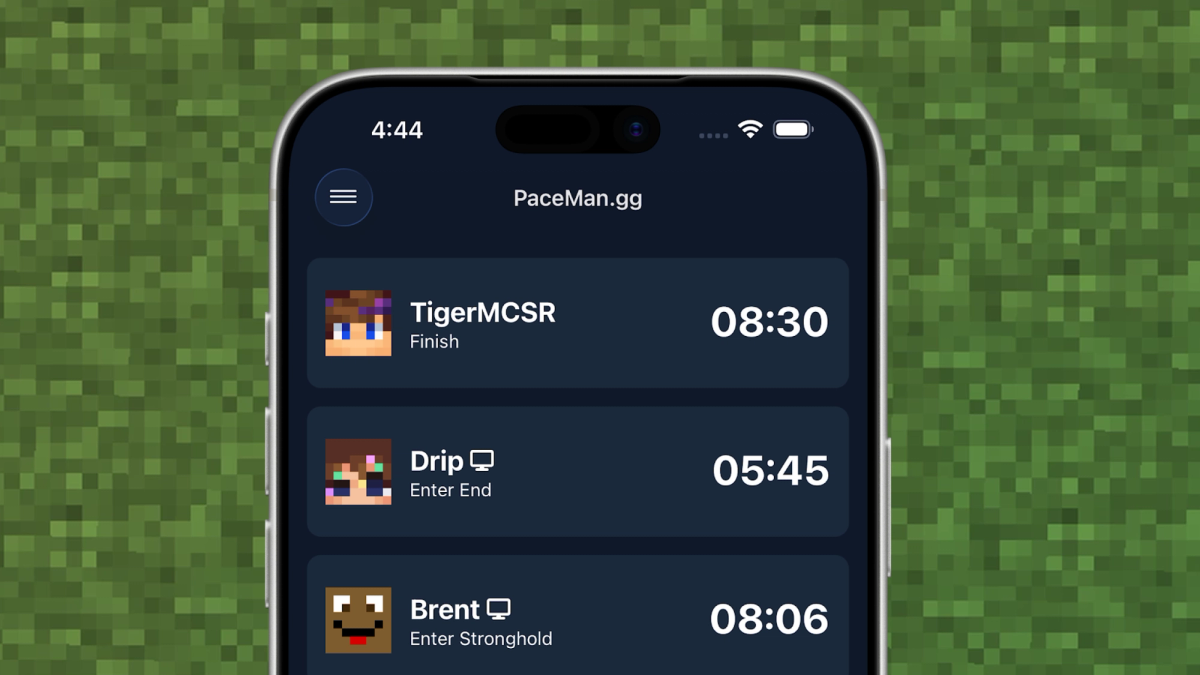
The PaceMan.gg mobile app
Fundamentally, the app is a simple, real-time Minecraft Speedrunning board. When you first open it, the home tab displays all speedrunners who are running the game at the moment, and what stage (split) of the speedrun they are at. The Leaderboard tab shows the fastest runs performed in a given timeframe (daily, weekly, monthly, all time). The Stats tab shows more comprehensive breakdowns of speedrunners’ statistics for different splits. It is intended to be a simple, glanceable interface for users to follow what is happening.
The app is completely developed with Expo (as of v1.2.0 of the app, 99.5 TypeScript and 0.5% Other 👀), and built using Expo's Services, which creates effortless feature parity across iOS and Android. In fact, the first few versions of the app were developed without a Mac: on a Windows device running WSL, an iPhone, and an old Android! Expo's cloud services allowed us to build and ship the app without a Mac.
Push Notifications using Expo Notifications
A core feature of this app is the ability to receive notifications when a speedrun gets on an exciting pace. This allows users to be notified of speedruns as they happen in real time, and also tune in if it’s being streamed live on Twitch.
An express.js microservice/backend (PushNotificationsService) manages the notifications, while another microservice/backend (ActiveRunsService) manages currently active speedruns. For each speedrun event, a WebSocket event is sent to PushNotificationsService via ActiveRunsService, which parses and decides whether the event should be notified or not (simply put, is it good speedrun pace or not). If yes, push tokens are fetched and notifications are sent to them. This is integrated with expo-server-sdk-node, all of which communicates with a MySQL DB and Redis instance to store tokens and other information.
Here is a simplified flowchart of the mind map of this system:
On the client side a <NotificationsProvider />, inspired from Beto’s tutorial, is implemented, which uses expo-notifications to handle all functionality, from registering the token, to handling notification events while the app is foregrounded/backgrounded.
Security with App Integrity
The PushNotificationsService backend also contains a few API routes for the mobile app to perform CRUD actions (to store the tokens as well as some preferences). With the introduction of the @expo/app-integrity package, and considering the way the CRUD was structured and only intended to be consumed by the mobile app, we decided to use App Integrity to add a layer of security on top of our routes.
Before performing API requests, the mobile app runs a getIntegrityHeaders() function, which performs an App Attest (iOS) or Play Integrity (Android) check against a unique challenge, and passes the same alongside the request. A middleware function - verifyIntegrity() - runs before the routes on the backend, and validates the integrity, then proceeds to the CRUD on a success or returns a 401 - Unauthorized on a failure. We use the node-app-attest (iOS) and @googleapis/playintegrity (Android) libraries on the backend to perform these validations.
A trimmed, cleaned up snippet for the getIntegrityHeaders() function is as follows:
This combination of App Integrity to address a unique challenge, along with using expo-secure-store to securely store the key ID in the keychain, ensures that the backend can only be interfaced by genuine installations of the app, keeping everything secure and clean. The Notifications Provider further handles any re-registration/token updating logic, all protected by App Integrity, to ensure users don’t miss any notifications.
Native Header with expo-glass-effect
We wanted the UI to look and feel as native as possible. One such example is the header. With the appropriate blur/styling effects applied to the header, scrolling feels streamlined with what the native platform should behave like. This includes Android (solid header), iOS before iOS 26 (translucent blur on header), and iOS for iOS 26 and after (transparent blur on header).
Inspired by Anurabh Verma’s implementation, as well as using the isLiquidGlassAvailable() handler from the expo-glass-effect package, a useScreenOptions() hook was implemented, to keep the look for the header consistent across pages:
Which is used as follows:
This helps us achieve a native feel while scrolling the headers.
There’s plans to invest more in the <GlassView /> component from the package to slowly add more Liquid Glass UI elements to the app. We wanted to implement this incrementally, to ensure the app’s UI stays sober yet fluid.
Future plans for PaceMan.gg
The app has a lot of plans for additional features such as Widgets, as well as room for improvement and refinements. We look forward to going deeper Expo and the supporting technologies from the community to maintain an amazing mobile experience for the Minecraft Speedrunning community.
P.S. While I worked on the mobile app using Expo, the project would not be possible without the amazing work of developers in the Minecraft Speedrunning community making the supporting pieces, utilities and interfaces for this tool, on top of which I have built the app. Huge shoutout to Specnr, Boyenn, Saanvi, Duncan, Jojoe, RedLime, Cylo, and a bunch of other developers who have made this project a reality.
Note: PaceMan.gg is a community-driven application to serve as a real-time speedrun pace tracker. This application is not affiliated with or endorsed by Minecraft, Mojang or Microsoft. In accordance with Minecraft's Usage Guidelines.