Expo Router v55 is here (yes, we traveled 49 versions into the future) and it is a meaningful step toward the same goal we have been chasing since Expo Router launched: delivering an even more native feel to apps while supporting more complex web scenarios so you can truly write your code only once.
This release does two big things at once:
It makes native UI a first-class part of routing. The new Stack API, toolbars, native tabs, dynamic platform colors, zoom transitions, and split view support let you build navigation UI the way you build the rest of your app: with React components, composed right where the screen lives.
It expands what “write it once” can mean on web. Expo Router now has a clearer runtime story with expo-server, configurable server headers, and experimental server rendering plus data loaders, so you can ship faster pages, better SEO, and more dynamic content without building a separate web stack.
Note that some of these APIs are still experimental and may be adjusted for best experience. As of 2026/02/xx the APIs shown in this post are up-to-date, but you can always find the more recent examples in Expo Router's documentation.
Below is a tour of what’s new, why it matters, and where to start trying it today.
New Stack API
The new Stack API gives you declarative, component-level control over the native header. We replaced the options API with composable React components you can use directly in your screen. Style the header, set the title, add a search bar - all inside your component tree.
Native Tabs
We’ve added support for the Native Tabs component. We’re actively working toward full support across all platforms and aim to mark the API as stable in the next release.
On Android, Native Tabs use Material Design 3 dynamic colors by default, automatically adapting to the user's preferred colors. You can use Material Symbols - similar to SF Symbols on iOS - by specifying the md prop on NativeTabs.Trigger. SafeAreaView is now integrated by default, so content is never hidden behind the tab bar.
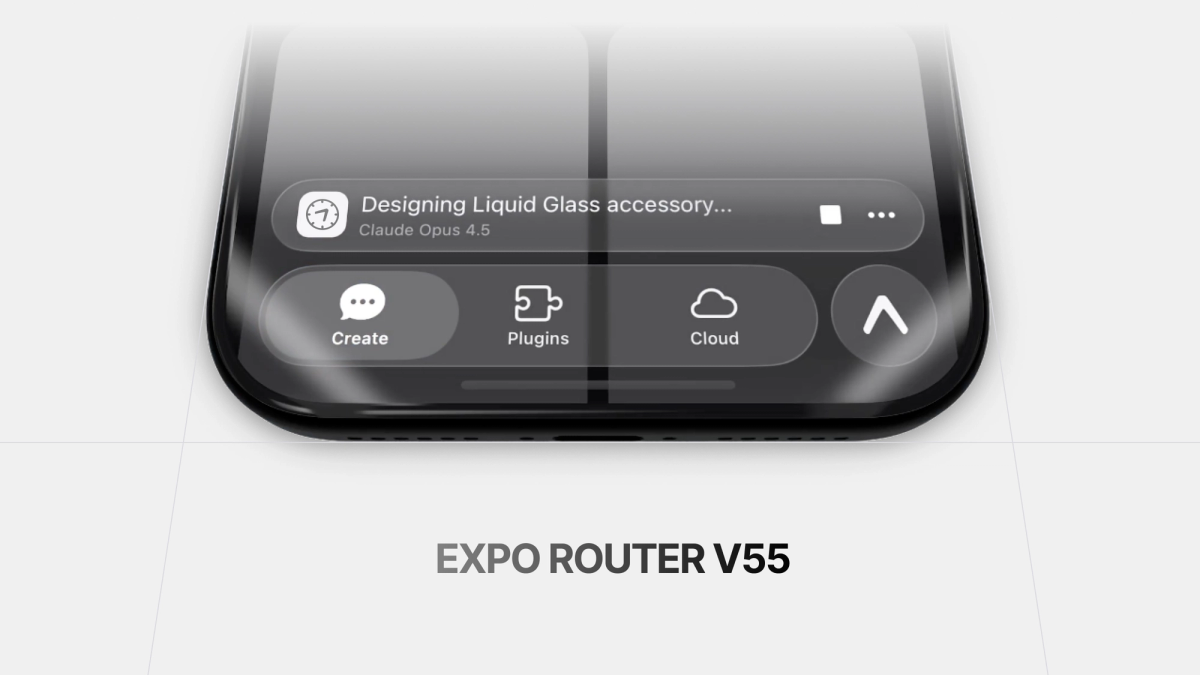
On iOS, we’ve added support for a bottom accessory - a floating view that appears above the tab bar - available starting in iOS 26. You can use it in Expo Router by adding the NativeTabs.BottomAccessory component inside your NativeTabs layout.
While working on this release, we introduced some breaking API changes. You can find a short migration guide here.
Check all the native tabs features in the documentation.
Dynamic Colors
The new Color API gives you direct access to platform colors: Color.ios.* for iOS system colors, Color.android.* for Android system colors, and Color.android.dynamic.* for Material Dynamic colors that adapt to the user's wallpaper.
Read more about the Color API in the documentation.
Toolbars
The new Toolbar API brings native iOS toolbars to Expo Router, with built-in animations and full liquid glass effect included. You can choose from three placements: left or right in the header, or anchored at the bottom of the screen.
Read more about toolbars in the documentation.
Zoom transition
The new Apple zoom API brings gesture-driven, interruptible, native shared element transitions to any <Link /> in your app, on Apple platforms, with default behavior on other platforms. We deconstructed the underlying UIKit API and reimagined it as a React-first, layered effect.
- Full zoom from Link to route.
- Zoom an individual view inside a Link to the route.
- Zoom an individual view to a shared view on the next route.
This gives you full control with graceful fallbacks that just work™. No new dependencies, no new imports, just the same powerful Link you’re already using.
To get started, set withAppleZoom on Link.Trigger
You can read more about zoom transitions in the documentation.
expo-server
The @expo/server package has been renamed to expo-server and now ships as part of the Expo SDK. It provides runtime server APIs for Expo Router projects, along with built-in deployment adapters for EAS Hosting as well as other platforms.
The runtime API is supported across all places where you’d write server-side code in Expo Router, including API routes (as shown above), middleware, data loaders, and React Server Components or functions. In production, expo-server not only works in EAS Hosting but also in Express, Vercel, Netlify, Cloudflare Workers, and Bun.
Learn more about expo-server in the documentation.
Server headers
You can now define custom HTTP headers for your routes directly in your app config. This is useful for things like security headers, caching policies, and cookies.
Headers apply to HTML and API route responses (but not static assets!). This is great for when you need cross-origin isolation for features like expo-sqlite on web.
Learn more about server headers in the documentation.
Experimental server rendering
We've added experimental support for server-side rendering your Expo app. Previously, Expo Router only supported static-site generation (SSG), which pre-generates HTML at build time. With server-side rendering (SSR), HTML is generated dynamically on each request, perfect for personalized content, real-time data, and improved SEO..
Learn more about experimental server rendering in the documentation.
Experimental data loaders
We’ve also added experimental support for data loaders. Data loaders let you fetch data on the server and access it in your component via a new useLoaderData hook that works for both static and server rendering.
This lets you co-locate your data fetching with your route component, but with the safety of keeping sensitive data server-side (such as environment variables) and without needing to manage separate API routes. Your client code only ever sees the result of a loader function:
Learn more in the documentation.
Static rendering
In static rendering mode (when web.output is set to static in your app config), loaders are executed at build-time, allowing you to prefetch any required data once before deployment.
Server rendering
In server rendering (when web.output is set to server in your app config, and experimental server rendering is enabled), loaders are executed at request time, and eliminate the need for separate API routes when you just need to fetch and display data:
Experimental split view
In collaboration with the React Native Screens team, we added experimental support for the native Apple UISplitViewController component. You can try it by running your app on an iPad.
Read more about split view in the documentation.
Where to start with Expo Router v55
Expo Router v55 is ultimately about one promise: your app should feel native by default, even when your codebase is shared. With SDK 55, that promise gets a lot more concrete.
- Native navigation UI, built like React. Declarative headers, search, toolbars, tabs, platform colors, and gesture-driven transitions let you build polished navigation without bolting on custom native code.
- A stronger web foundation.
expo-server, server headers, and experimental SSR plus data loaders unlock better performance, better SEO, and more dynamic experiences while keeping your app architecture consistent. - Better experiences on more form factors. Features like split view push Router further into “real app” territory on iPad and larger screens.
If you are upgrading, start with the native tabs migration notes, then pick one new API to adopt (Stack Header or Native Tabs are great first wins). And if you try the experimental web features, treat them like you would any new platform capability: kick the tires, ship behind a flag if you need to, and tell us what breaks so we can make them boring and stable.
And show us what you’re building! Tag us on social, send us a DM, or share it in Discord. We want to see what you build!