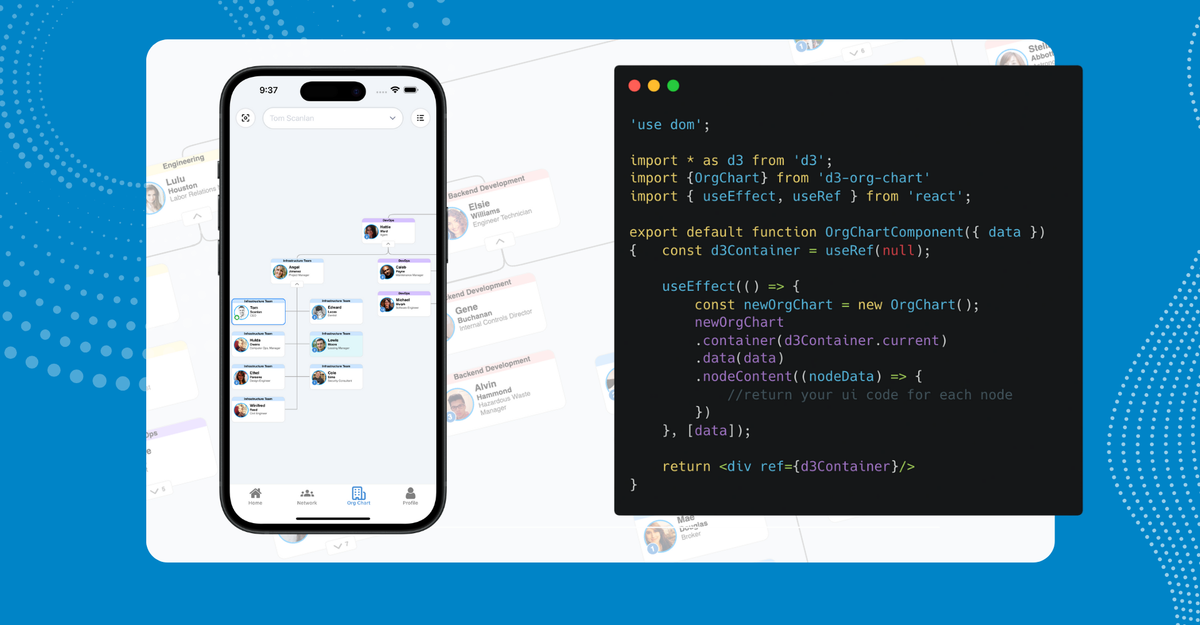
At InCommon we wanted to add beautiful charts into our mobile app but we couldn't find a React Native library that matched the quality we were looking for. For a while we were cooking up our own solution and then Expo released DOM Components and everything changed.
What is InCommon?
InCommon is a mobile app that helps employees at companies build connections and get to know each other based on the things they have in common. We have fun profiles, interest matching, a directory, and more. One feature we wanted to implement for a long time was an org chart, so you could easily look around the organization and get to know people faster.
The challenge was that most of the React Native charting libraries are basic. There are offerings like line and bar charts, but there is nothing quite like D3 on the web with its extensive open source offerings.
How we use DOM Components
That’s where DOM Components came in for us. Before Expo SDK 52 was announced we were attempting to build our own in-house bridge from mobile to a React component. But the best we came up with was a webview to our web application where we would need to re-authenticate the user before seeing the org chart given it contains sensitive information.
Just as we were nearing the end of this solution, Expo 52 was announced and with it - DOM Components. It was almost as if Evan Bacon was sitting in our meetings listening to our needs. (Though I think the original intention was to assist with incremental migration from web to native.)
How to set up DOM Components
Thankfully, using DOM Components is very simple. The components fit well in your UI and work alongside your native code well with a few caveats.
For starters you will need to be running Expo 52.
Getting a component running to see if it works is a good start. Create a default exported component from a file that has use dom at the top. This is what will tell Expo to render inside of a webview.
Next you need to import that component into one of your react native screens to see it render in the UI.
Now that we have HTML rendering to our view, let’s build the org chart. We used the d3-org-chart library. Normally importing and attempting to use D3 in react native would not work. But all of the things you can do on the web are now possible in this file.
Notice we are missing a data prop in our route file that we now need for our Org Chart DOM Component. It might be tempting to try to load this data into the component via a hook or some kind of state or API call. This is one of the caveats of using DOM Components.
Similar to how your React Native ecosystem is completely unaware of how to run web code like D3, your DOM Component is completely unaware of anything you have going on in your React Native code. All the communication, functionality, data, and callbacks must be passed via props. This means other information you may needs like user info that you may have in your state is also accessible only via props. Your props list can become very long so keeping your DOM Components simple and flat might be to your benefit.
Say for example, when a user presses on a node (a person in the org chart) we want to route to that person’s profile and have a haptic feedback occur. This will need to be a callback prop passed between the route and DOM Component as the router and haptics functionality comes from Expo and is not something your web code will be able to recognize.
That’s pretty much it! With further development on the data you want and your styling, you can create a beautiful dynamic org chart that works on your mobile app. It’s powered by D3 and your users experience it seamlessly as if it was still all in a native app.
Other benefits of DOM Components
InCommon leverages Expo for our iOS and Android apps. But we also use it to generate our web application. Our entire mobile app shares code with our web app. And the great part about DOM components is that they work great if you do this. Without having to do anything extra, we were able to keep our org chart running on both mobile and web.
Wrapping Up
As InCommon continues to build out our offerings, one thing we are taking a look at is bringing our web application’s admin dashboard to mobile. We currently use a lot of charts from recharts and we would rather not rebuild those in a react native library. We intend to use Expo DOM Components again to help save time recycling code to make that possible. I hope this blog helps convince someone else to give DOM Components a try.
If you’d like to learn more about InCommon and how your company can use it (and get access to this awesome mobile org chart), please check out our website.
You can also reach out to me on LinkedIn if you have follow-up questions!