This is a guest post from Solarin Johnson - a 17-year-old developer building animated UIs with Expo. He's obsessed with clean motion and smooth user flows.
...
The Expo ecosystem keeps adding new features and capabilities, and their newest thing, EAS Hosting, makes it really easy to deploy React Native web apps. If you’ve ever deployed a Next.js app with Vercel, the experience will feel familiar.
I experienced this myself recently when I saw a cool prototype on X (Twitter) and wanted to replicate it in React Native (Expo). The next thing I knew I was deploying with EAS Hosting!
My original idea was simply to:
- Experiment with Reanimated for scroll-based animations.
- Show that Expo can handle complex animations smoothly.
The core features are powered by Reanimated and Expo Router (even though it’s a single page). Here’s a quick technical breakdown:
Scroll-Linked Progress Bar
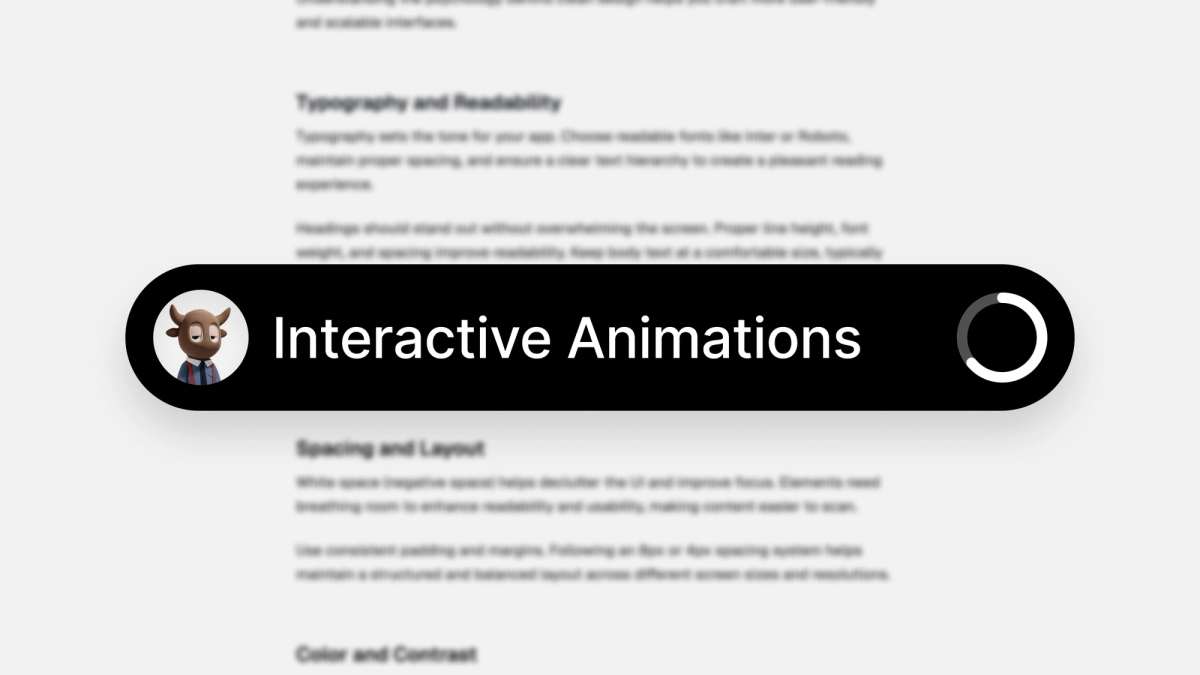
There's a bottom flow bar that displays the title of the section the user is currently reading (based on scroll position).
- It also functions as a radial progress bar, visually representing reading progress
- The progress bar dynamically updates as the user scrolls through the content.
Tracking Scroll Position
Expanding and collapsing the flow bar
By default, the bottom flow bar is minimal, showing just the current section title and a radial progress. Tapping it expands the bar to display:
- Previous and next section titles
- Time progress indicator (like a media player progress bar)
Toggling the Expanded State
Progress Bar Component
To see this code in action check out:
- GitHub Repo: GitHub.
- Live Demo: expo-blog.expo.app
Now that you can see the animation demo is working, let’s talk about how I deployed it online using EAS Hosting, without any extra setup.
Why EAS Hosting?
With EAS Hosting, it's super easy. Only two commands in the Command Line Interface (CLI), and you can go live with your Expo Web app. No need to waste time uploading your app and configuring it manually. Just deploy, and you'll be given your URL right away. Here are some of the key benefits I observed from my experience deploying with EAS Hosting:
- Minimal Setup – No need to configure servers or CDNs.
- Fast Deployments – Your app goes live in seconds.
- Try It Out Free –EAS Hosting is still in preview mode, so there's no need to spend money to deploy your app.
Deploying with EAS Hosting
The process couldn’t be easier. Here are the 4 steps:
1. Prepare Your App
First, make sure your Expo Web app runs correctly on your local machine. If it works locally, it should work after deployment.
2. Export for Web
Run the following command to generate the static web build:
This creates a dist folder containing your optimized web output.
3. Deploy to EAS Hosting
Now, deploy your app:
If you haven’t logged into EAS via CLI, it’ll prompt you to do so. Once authenticated, your app gets deployed, and you receive a URL where it’s hosted.
Want to deploy directly to production? Use:
By default, Expo auto-generates a favicon based on your app.json, so you don’t have to worry about it.
4. Monitor performance and requests
Once your app is deployed, EAS Hosting doesn’t just serve your app—it also helps you track its performance. You can monitor:
- Incoming requests – See how many users are accessing your site.
- Crashes & errors – Identify unexpected issues that could affect user experience.
- Deployment history – Keep track of when you deployed and what changed.
Optimizing an Expo web app for SEO and sharing
Now that your app is live, let’s talk about making it search-friendly and ensuring it looks great when shared.
By default, Expo Web exports don’t include much metadata. Without meta tags, your app might not show proper previews on Google, Twitter, or WhatsApp.
Adding Meta Tags in Expo Web
Expo Router provides a built-in way to add meta tags using expo-router/head, similar to Next.js <Head> component.
Here’s an example:
Pro Tip: No need to add a <link rel="icon" /> manually—Expo Web automatically generates a favicon when you export.
Also, if your app works locally, EAS Hosting makes sure it works online without any extra steps.
My reflections on EAS Hosting
- Deployment Speed – Extremely fast; no unnecessary steps.
- Reliability – No major errors during deployment.
- Ease of Use – The CLI-based flow is intuitive, even for beginners.
EAS Hosting makes deploying Expo Web apps as simple as running two commands. If you’re already using Expo, it’s worth trying out—no extra setup, no hassle.
As Expo continues improving its ecosystem, EAS Hosting is shaping up to be the go-to deployment solution. Whether for quick prototypes or production-ready apps, it just works.