What if you could snap a photo of a wine label and instantly get tasting notes, food pairings, and reviews - all powered by AI?
That’s exactly the idea behind Wine AI.
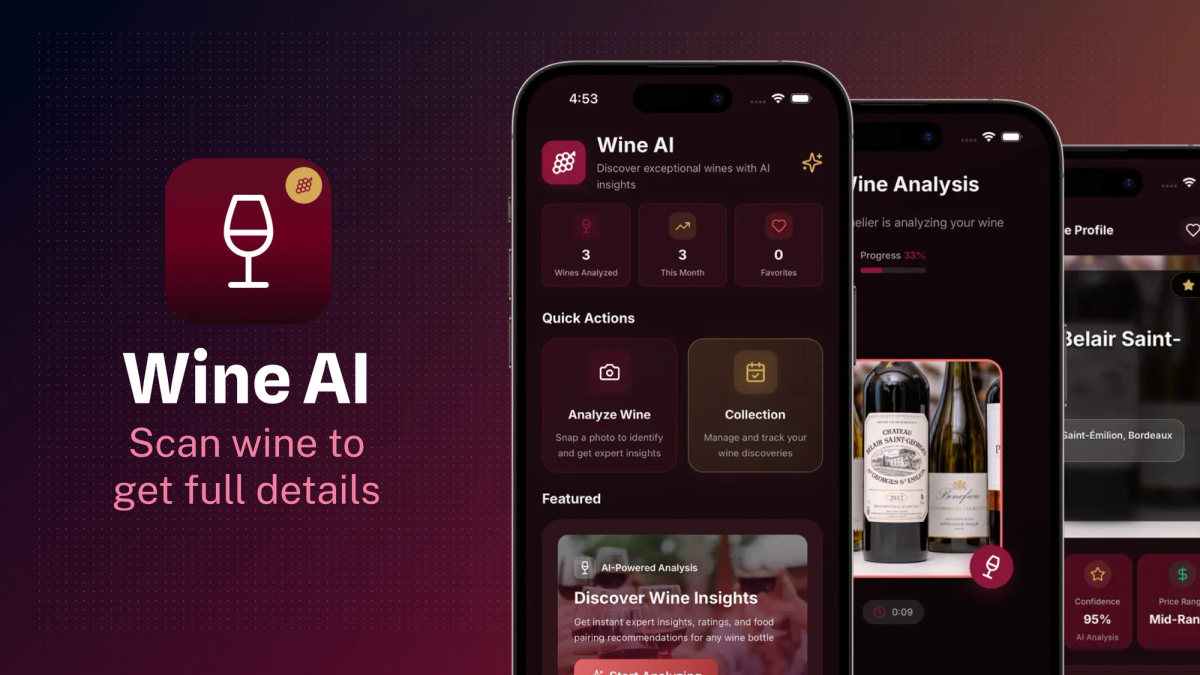
This app lets users take or upload a photo of a wine bottle and instantly get detailed, structured information about that wine: tasting notes, origin, food pairings, and more. Users can also save their wine analyses, generate a PDF report, and share it with friends.
In this post, I’ll share how I built Wine AI using Expo - how I went from idea to App Store in a few weeks, all as a solo developer, with no need to wrestle with native code.
The idea behind Wine AI
Wine AI was born from a simple frustration: wine labels often look fancy but tell you very little. I wanted an app that could instantly explain what a wine is, whether it's good, and what it pairs well with, just by taking a photo.
The app is for:
- Wine beginners who want help choosing wine
- Casual drinkers who want to understand what they’re drinking
- Anyone curious about a bottle in their hand
Here's a typical use case: snap a photo of a wine label, wait a few seconds, and get a clean, structured breakdown of the wine. It's like having a sommelier in your pocket.
And here are some fun things the users are learning from the app:
- Flavor profile: is it fruity, dry, bold, etc.
- Food pairings: what dish goes best with this wine
- Wine region and grape variety
- Rating and review-style breakdowns
Built with the modern Expo stack
Expo is the main reason this app exists. I’ve used React Native before, but Expo makes things 10x faster, especially for solo projects.
Here are the core tools I used:
- Expo Router: This made navigation dead simple. I structured pages like I would in a web app. No confusing stack/tab setup, and it scales well as the app grows.
- NativeWind: For styling, I didn’t want to write a custom stylesheet for everything. NativeWind (Tailwind for React Native) helped me keep UI clean, consistent, and fast to iterate on.
- Expo Camera & Image Picker: These two modules handled the core functionality: taking or selecting wine label photos. The API was easy to integrate, and I had full control over how and when the user interacts with the camera.
- Expo Modules like Haptics, Print, Sharing, StoreReview: These added polish to the user experience. For example:
- I used expo-print to generate PDF wine reports
- expo-sharing allowed users to send the PDF easily
- expo-store-review prompts users for feedback
- expo-haptics gave the UI a nice responsive feel
The best part is that I didn't have to configure anything natively. These modules just worked out of the box. It felt like building a website, but the result is a native-quality mobile app.
Smart, scalable integrations
Besides the Expo stack, I also used several services to make Wine AI smart and scalable.
- OpenAI and Google Generative AI: Once a user uploads a photo, the label text is extracted (with OCR) and passed into AI models. These models then return structured insights - wine type, tasting notes, origin, and pairing suggestions.
- Supabase: I used Supabase to store user data, including scan history and metadata. It’s simple, secure, and has a great free tier. Also helpful for managing user sessions and anonymous users.
- RevenueCat: I added premium features like unlimited scans and PDF exports. RevenueCat made it easy to manage subscriptions, check entitlement status, and sync with the App Store, all without touching any native payment code.
I also created a simple architecture where the client handles image capture and sends minimal data to the backend, which interacts with AI services and returns a clean response to display.
How Expo increases productivity
I’ve worked on native and hybrid apps before, but Expo is the first time I’ve felt truly productive from day one.
Here’s why it worked so well:
- Fast iteration: I used
npx expo startwith Expo development build to test on my device in seconds. I could try new UI ideas or backend flows and get feedback instantly. - Over-the-air (OTA) updates: Fixing a typo or improving logic didn’t require resubmitting to the App Store. I could push updates on the fly and users would get them automatically.
- Easy deployment with EAS: I used
npx eas buildto generate production builds. To push to TestFlight, I simply usednpx testflight. No need to open Xcode or mess with provisioning manually. - No need to go native: I accessed camera, file system, haptics, and more without touching native code. That let me stay focused on shipping features instead of fighting native issues.
- Expo Router: Routing in mobile apps is usually painful. With Expo Router, it felt like building a web app - intuitive file-based routing that scaled naturally as the app grew.
What's next for Wine AI?
Wine AI is just getting started. Here’s what I’m planning:
- Wine journal - let users add personal notes for each wine
- Social features - share wines with friends or on social media
- Label recognition - improve label scanning speed and accuracy using custom ML
- Deeper wine database integration - pull from public wine APIs to enhance results
- Android release - now that iOS is done, expanding to Android is the next step
I'm also planning to improve onboarding, add light/dark mode, and grow App Store visibility.
Resources for learning to build an AI app
Wine AI started as a fun side project. Thanks to Expo, I was able to go from an idea to a working, polished app that’s now live on the App Store - without needing to build native modules myself.
If you're a solo developer or small team with a creative idea, you don’t need a huge budget or a big team. Expo gives you all the tools you need to build and ship something great - fast.
This was one of the smoothest development experiences I've had. And I’m already thinking about what to build next.