This is a guest post from Laurens Lamberts - a freelance React Native developer and musician based in the Netherlands.
...
I’m a big fan of (guitar) effects pedals. I enjoy using them to shape sound for my musical projects, but also simply as a way to relax. Often, I’m found in my attic, turning controls and drifting away in thoughts with how the effects transform the sounds of my instrument into something interstellar.
My all-time favorite pedal-building company is Chase Bliss from Minneapolis, USA. Every pedal they make is surrounded by fun, almost infinite tweaking options, and built in a rugged, consistent esthetic.
- In 2024 I noticed Chase Bliss had a Discord and I joined immediately.
- In 2025 a fan-made website showing the factory presets of the pedals disappeared!
In the Discord I posted a message asking if a similar thing would reappear, but there were no plans for that.
I fixated on how awesome it would be to get those back in an accessible way for all Chase Bliss pedal owners and extend on that idea. That’s when Jordy (a fellow Dutchman) reached out to me, asking if we should join forces. And that is when we decided to build the Chase Bliss app (iOS, Android) - it’s a preset manager app for all Chase Bliss pedal obsessed musicians like me.
We’ve been building this app since February 2025. Made by the community, for the community.
Just look at these beauties...
What does the app do, exactly?
The first milestone we had was simply keeping track of your favorite sounds in the app. Tweaking the knobs and switches on the pedal influences how it affects the incoming sound, and with so many controls (6 knobs, 3 toggles, 16 mini-switches) there are a lot of sounds to discover in each and every Chase Bliss pedal.
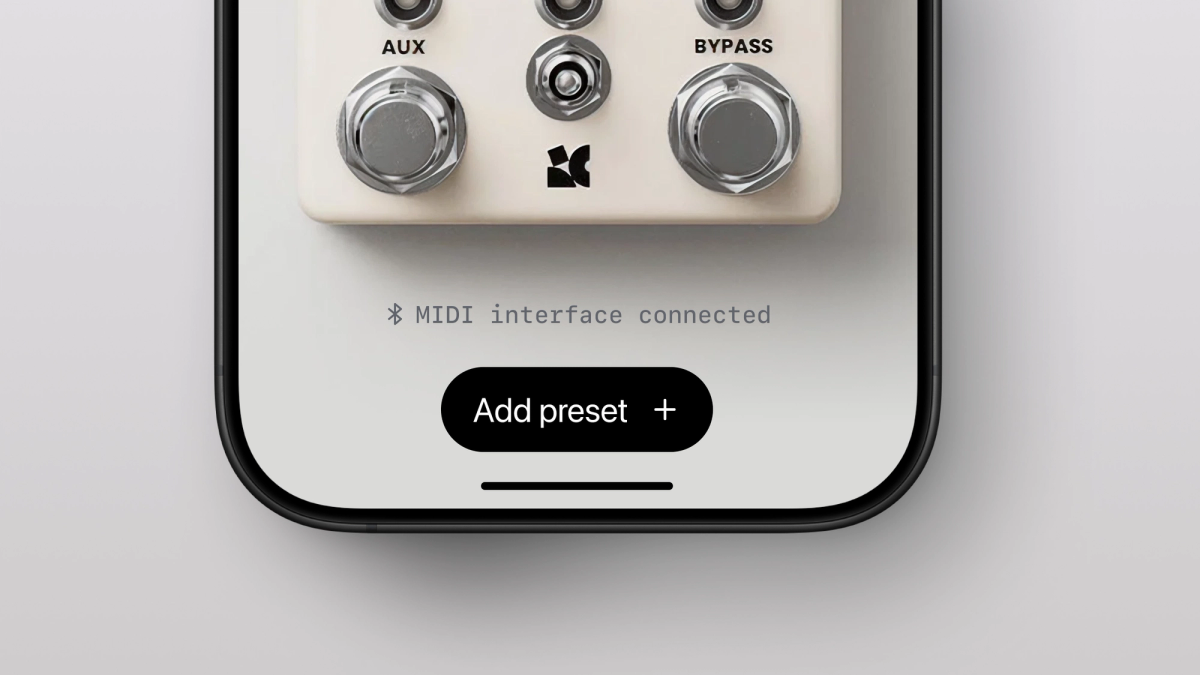
We built a (React Native) interface where you can select the pedal you own and interact with controls in the app to align them to the controls on their physical counterpart. Then give it a name of choice and save that configuration for later use. We call this a ‘preset’. The pedal in the app perfectly resembles the physical pedal, making it as intuitive to configure as possible.
A look at the app interface
Our next milestones were:
- Being able to share these presets with others
- Discover new sounds & possibilities with your pedals by exploring what others have shared
All this while ensuring user privacy. Collecting as little data as we need to keep the app running, and gain some basic, anonymous insights about how features are being used.
Additionally, we added the pedal-manual PDF’s within the app for easy access.
We aimed for creating a fun and playful interface, with as much clarity on all the settings that a pedal-preset can contain. For example, as the knobs on the physical pedals are not motorized, the user has to remember how secondary (hidden) options are set. The app helps in being able to show all values of all modes.
What we made couldn’t have been done properly without help and the permission to use the first-party assets and resources (pedal pictures, fonts, the factory presets…) from Chase Bliss. So we’re very grateful for that.
Why we chose Expo
The main reason we chose Expo is to build for both iOS and Android, without the need for keeping the native projects up to date manually. I started using Expo about a year ago, and it has saved me a lot of time.
Before Expo I often spent hours troubleshooting various configurations of the native projects. For example, I would face an issue, browse the internet for people in the same boat and end up patching an obscure build setting within the native iOS project. Only to forget that I changed that along the way, eventually causing other issues. Now with Expo we can safely delete both native folders at any time. Also we have an easy-to-read configuration file, complemented with some custom Expo plugins and modules to change native code.
I think it’s great that Expo is now considered the standard way to build React Native apps. It makes working with React Native a delight and much more approachable.
Also the Expo packages are great. For so many app capabilities there is an Expo package to help developing it. For this project we are using expo-haptics, expo-blur, expo-sharing, expo-apple-authentication + many more. And we are now installing expo-audio for audio playback. We’ve noticed great stability with these libraries, and see consistent maintenance on them as these open source packages are maintained by Expo.
Building a custom Expo Module
An idea we’ve had from the beginning is to see if we could hook the app up with the pedal hardware, finding a way to send the presets to your actual (physical) pedal.
A few examples of presets in the app
These pedals have a MIDI (1/4 inch jack) interface, and we thought it would be amazing to be able to “beam” your presets from the app to your pedals, having them take over the settings for you to play through. For this “beaming” we figured Bluetooth would be most feasible, and I obtained a WIDI Jack (a product by CME) to test interfacing with the pedal.
I am no expert in Swift and Kotlin development, and most certainly didn’t know anything about the MIDI specification. With a lot of help from Github Copilot I constructed an Expo module for adding “MIDI over Bluetooth” support for our app. At first, I worked on a proof of concept for the iOS side, which I got working. Then I asked Copilot to implement similar functionality with matching function names and behavior to the iOS side. With some (still very much required) manual-human thinking “we” got Android working as well.
One of the offerings by Chase Bliss has motorized faders for the sound variables, so this made for a great demo. We were able to send the presets in the app towards the pedal, and within milliseconds you would see the faders flying and adapt to the preset from the app.
It was a magical feeling to see the pieces of this project coming together.
Further tech used
The app relies on Reanimated with React Native Skia and Gesture Handler to allow for smooth interactions with the knobs and controls of the “pedal”. As you drag the knob vertically, it rotates to display the value selected. There are multiple “views”, and when you switch between them, the knobs automatically animate their rotation to visualize the knob values for that mode.
We’re currently exploring multiple ways to playfully display exact values and nuances of what the user is selecting. These will be directly bound to the reanimated values, keeping things performant, even when the JS thread would be busy.
What are the future plans?
We showed what we built so far to the team at Chase Bliss, and we are still talking about how to move forward with the app. As fans of the Chase Bliss company, what they do and what they stand for, this has been really exciting for us!
The “MIDI over Bluetooth” feature is now stable, but we still have some things to finish before that will be included in a release. Mainly explaining to the user how to get started, getting the interface as clear as possible and making sure we tested all MIDI commands with the pedals.
We have many ideas for features in this app, but we want to be considerate about what we’ll add. We don’t want to pollute the app’s interface with too many options, and we need to keep it intuitive and maintainable. The list of ideas is extensive, so we started prioritizing and drafting a roadmap. We’ll ensure to stay open to user feedback of all sorts, and aim for making the app the most useful tool it can be for Chase Bliss pedal fanatics.