Build speed is a critical factor in development productivity. At Expo, we’re constantly optimizing our pipelines to deliver faster, more reliable feedback. One of our most powerful internal workflows combines fingerprinting and repacking to dramatically reduce build times—especially for CI smoke tests and internal QA. Below, you’ll find definitions, performance metrics, a real-world case study, and a complete implementation example.
How the Fingerprint, Repack workflow works
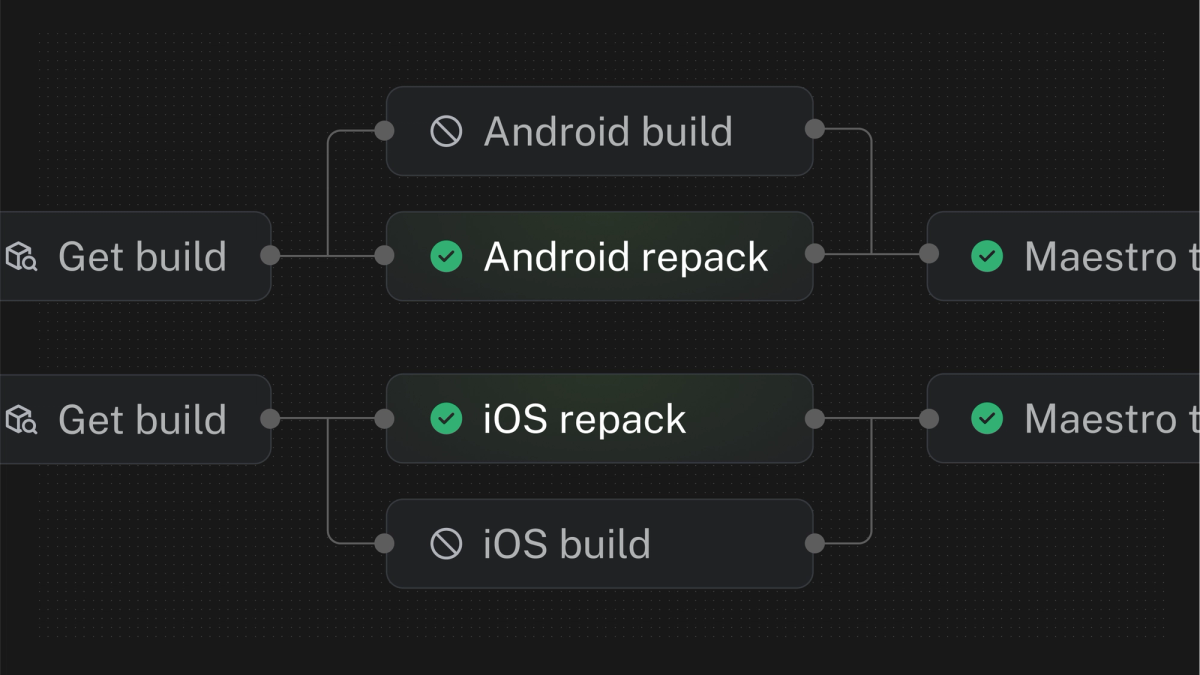
This is a quick summary of the key steps involved in the workflow so you can see how these tools work together to avoid unnecessary native builds.
- The
fingerprintjob generates a deterministic hash of your app’s native state for each platform. get-buildchecks whether an existing build matches the hashes for each platform.- If a matching build exists, the
repackjob copies it and replaces its metadata + JavaScript bundle. - If no matching build exists, the workflow triggers a
build. - Finally, end-to-end tests (eg: with
maestro) are run against the either the repacked or freshly built apps.
What is fingerprinting?
@expo/fingerprint produces a single hash that represents every native dependency and configuration in your project. With it, your CI can answer questions like:
- Were native files modified? Only trigger native builds when necessary.
- Which native files were modified? By default, a fingerprint is stored on EAS for every build and update, and that you can compare fingerprints to understand what changed in your native runtime.
- Can I deploy my code with EAS Update to an existing release? Determine runtime compatibility to ensure your changes run safely in production.
Learn more in our “Fingerprint Your Native Runtime” blog post.
What is repacking?
Originally built in 2024 to speed up our App.js keynote demo, we define repacking as taking an existing binary and injecting a new JavaScript bundle and associated metadata—skipping the entire native compilation step (”everything old is new again”). When paired with Fingerprint, Repack only runs if your hash matches a previous build, cutting full-build time down to approximately the time it takes to calculate the fingerprint and bundle your JavaScript app.
You can think of repacking as a particularly high level type of caching, where the fingerprint is the cache key and the entire native build is cached — only the JavaScript bundle and metadata are updated.
Performance improvements with repacking
The improvements you should expect will depend on your app build time. You can estimate this by looking at the duration of your “Run fastlane” or “Run gradlew” steps on EAS Build. The following is an example of an improvement observed in a large, real-world application.
- Average duration of a full native build: ~23 mins
- Average duration of repacking: ~5 minutes
That’s roughly a 78% reduction in CI build time—cutting 18 minutes off of the time it would take for you to get feedback from an end-to-end test run.
Repacking workflow case study
A client of ours (who we cannot name) and Infinite Red reached out to us after identifying repacking as a potential time-saver for their CI processes. Working in partnership with our team, they successfully implemented this workflow for their PR smoke tests, cutting job run times approximately in half. That’s half as much time waiting on CI to run, which unblocks engineers and accelerates their development cycles.
Based on their success, we’ve now published repack as a pre-packaged job in EAS Workflows.
Ideal use cases for repacking
- PR smoke testing: Validate core functionality immediately after each commit.
- Internal QA: In roughly the same amount of time that it takes to publish an update with EAS Update, you can repack an existing build that launches directly into the version of your app that you’d like to test (rather than downloading an existing build with an older JavaScript app version and loading an update in it).
When not to use repacking
App Store submissions: Production builds should go through the full build pipeline for correct symbolication and signing. Tools like Sentry may not be able to locate symbol files in repacked binaries. We may be able to improve repacking to support this in the future, but it is not currently planned.
Example workflow configuration
Here’s how you can integrate fingerprinting and repacking directly into your .eas/workflows/ci-fingerprint-repack.yml using pre-packaged jobs. This setup ensures that every pull request benefits from faster, smarter CI.
Conclusion
By using repacking in your testing and QA workflows, you can:
- Dramatically reduce CI build times
- Trigger full native builds only when needed
- Deliver faster feedback to developers and testers
While full production builds still require Expo’s standard pipeline, this combo is a game-changer for internal testing and PR validation. Give it a try in your next EAS Workflow and spend less time sword fighting.