We started 2024 by talking about our mission: create the best way for developers to write application code. Whether you’re a web or native developer, we’re making tools to help you create features your users love.
As Expo’s Head of Product, I’m always looking at the horizon to see what’s next. To find that path, it’s useful to reflect on where we’ve come from. It turns out, we went a lot of places this year and we shipped a lot of things (see below).
So, let’s take a look back at everything we shipped in 2024. If you missed us this year, this is the ultimate cheat sheet to get up to date with everything Expo. Then, we’ll look ahead to where we’re headed in 2025.
2024 Expo Accomplishments
We’re really proud of the features and capabilities we shipped in 2024. There were too many for this post, so we’re going to focus on the highlights.
SDKs 50, 51, 52
We added a ton of features and improvements to the Expo SDK this year through SDKs 50, 51, and 52, the last of which is our largest release ever.
In SDK 52, we made React Native’s New Architecture the default for all new projects. By upgrading the way React Native works, user interactions will be faster, and it paves the way for the future of React Native as the best way to write universal apps.
We also worked closely with the team at Meta to become their recommended React Native Framework. Meta now recommends Expo as the default way to build React Native apps because we provide a full suite of APIs and tools that enable developers to build production-ready apps.
While there are literally hundreds of updates to our SDKs over 2024, we’re especially excited about rebuilding some of our core libraries like expo-video, expo-camera, expo-sqlite, and expo-file-system. These rewrites provide access to more native APIs and allow you to create features like playing a video in a pop-up window with Picture in Picture support.
Expo developers have never had more high-quality and up-to-date libraries than they do now. Check out our full release notes for each SDK this year. You’ll certainly find a new API or improvement that will make your app shine.
Expo Router v3 and v4
Expo Router allows you to use files to describe your app’s navigation structure with less boilerplate code to make everything work. To make it even easier to use, it has key features like autocompletion and type safety for navigation, SEO and accessibility for web, automatic universal linking, lazy bundling, and more.
With v3 of Expo Router, we added:
- API Routes (beta): Build universal server endpoints for your app and website.
- Bundle splitting (web): Route-based bundle splitting on web for faster page loads.
- Speed improvements: 2x faster static web builds, 30% smaller base JS bundle, added
.mjssupport. - Testing library: You can now test and reproduce complex navigation flows with Jest.
- Web
<Link />props: Configure and style<Link />components with the newtarget,push, andclassNameprops.
And with Expo Router v4, we added:
- React Navigation v7 support
- DOM Components support
- Enhanced tree shaking
- Streaming fetch with
expo/fetch - A preview of Server Components and Server Actions, as demonstrated at React conf 2024.
Check out the latest docs for Expo Router on our docs.
DOM components
Many developers are starting with an existing React codebase, which is close to React Native, but it’s not the same as React Native. Migrating an existing React application to a React Native one can be tricky and time consuming. This year we released the ability to use React DOM components, like <div>, <span>, and even <marquee> in Expo apps.
To accomplish this, we wrap React DOM components inside WebViews, which allows you to use them like a normal components with props. To enable it in a file, use the “use dom” directive at the top of a file. This works with any web library within your DOM components.
There a lot of new examples of DOM Components in the wild. Here are a few of the ones that stood out:
- Thor used DOM components for custom Protomaps tiles.
- Raphaël used DOM components to quickly add a spherical photo viewer.
- Evan Bacon has shared a lot of examples.
- And Beto recently made this tutorial video for a great DOM Component use case:
Check out Evan Bacon's recent "Introducing DOM components" talk, and get started by reading the DOM Components guide.
Fingerprint
There’s a unique problem developers run into with native builds and over-the-air updates: you have to make sure the updates are compatible with the underlying native runtime inside a build.
Previously developers tracked the version of their native binary with version numbers, while making sure that all updates were created with the same version numbers. If teams ever made a mistake, they might send out an incompatible update, which is not ideal.
So, this year, we developed @expo/fingerprint. A fingerprint is a snapshot of your project’s native characteristics and we’re able to create a unique hash from it. With that hash, we can confidently know if an update is compatible with a specific build.
In addition, we can use a fingerprint to conditionally make a new development build or publish a preview update depending on whether native dependencies changed inside EAS Workflows (more on that below).
You can learn more about fingerprint runtime versioning on our docs.
Atlas & DevTools
One of the best parts about web development is that you get a wide array of developer tooling to help you optimize your bundle while also being able to see how your app works while you develop it.
This year, we introduced Expo Atlas, which allows you to visualize and understand your bundle output. This makes it easier to spot optimization opportunities, which can help you decrease your bundle size. A smaller bundle means more of your users will get your latest over-the-air updates.
We also added support for Meta’s new React Native DevTools. These tools will feel familiar to web developers since they’re based on Chrome’s DevTools. You’ll get breakpoints with enhanced UIs, a React Components inspector, and even a network tab. Next time you run npx expo start, press j to pull up the new DevTools.
expo.new
Getting started with a new project can be tricky. Not only was our default template a blank canvas, but setting up emulators, simulators, development builds, and Expo Go can fill up an afternoon.
To solve this, we made expo.new. It’s a website that helps you get started developing locally in about 5 minutes, which includes creating a development build. These projects come with starter code and are ready to build, submit, and update. If you prefer reading through docs, you can follow along manually with our new setup guides instead. Either way, we hope these tools will help your next project get off to a running start.
Workflows
At the beginning for 2024, we shipped custom build jobs. This feature allowed developers to customize the build process, including running arbitrary code. For example, you could send a Slack message when a build finishes.
Later on, we shipped automatic publishing of preview updates via our GitHub app. This feature allows developers to publish a preview update on every commit. Instead of pulling your teammate’s code locally to preview it, you can now tap on their PR’s branch name in a development build and see it in seconds.
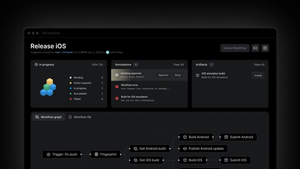
Both of these features gave us enough signal to build EAS Workflows: a React Native CI/CD service that helps you and your team develop and release your app. With Workflows, you can do things like build your project into an Android or iOS app, then end-to-end test it with Maestro. Or you can run lint, type checks, and unit tests, all before publishing a preview update.
We are thrilled to see people using it already, even while it’s still in preview. You can start using it by following our getting started doc.
Environment variables, security activity, and audit logs
While we made many improvements to our website, here are three of the highlights:
- We released environment variables, which allows you to securely store environment variables on EAS and keep them in sync while building, updating, and even locally as you develop.
- We also released security activity. It gives all EAS users insight into modification actions on their EAS user profile and helps them investigate any suspicious activity.
- Finally, we released audit logs for Enterprise customers, so that you can track actions like permission grants, credential modifications, and actions taken on apps.
What’s next for Expo?
Like every new year, we have many ideas and plans for 2025. Lately we’ve been thinking a lot about how we can help developers run their websites and API functions.
We’re also going to continue iterating on EAS Workflows. Our plans include features like approvals, cron jobs, a pre-packaged fingerprint job, better debugging tools, and more.
Finally, in 2025 you’ll see us continue creating the best way to write application code with our SDKs and developer tooling. We’re also interested in finding better ways for teams to test and release their apps, then helping them answer questions like, “how is my app doing?”.
Thank you
We can’t say it enough: thank you to everyone who contributed their time and energy toward the React and Expo ecosystems this year. All of your feedback and even your time talking to us at conferences made this a stellar year for us.
As always, we’re excited to continue building with you.
We’ll see you next year! ✌️