

EAS supports build caching, which can speed up subsequent builds by up to 30% on both Android and iOS builds. Build caching is available to all users at no additional cost, whether you're on a free or paid plan.
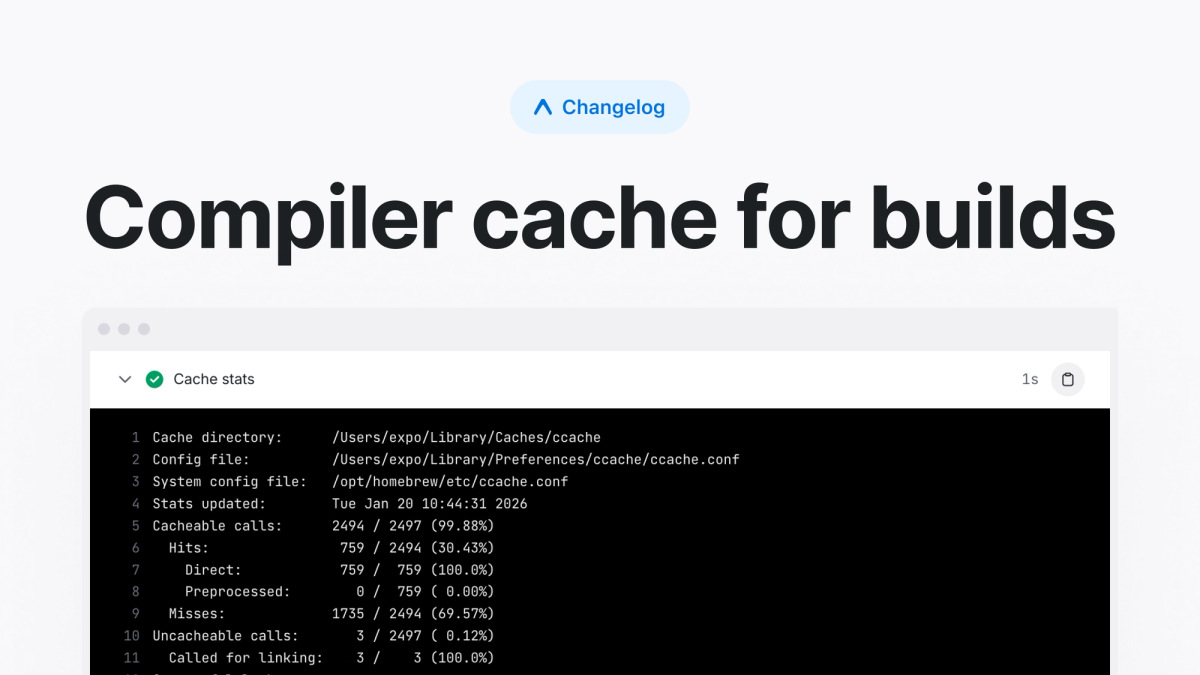
Compiler cache for builds
Builds on EAS now support saving and restoring compiler caches with ccache. ccache is a compiler cache that speeds up recompilation by caching the results of C/C++ compilation. The saved cache will store shared output between builds such as .o files, compilation results for native libraries used by React Native, Hermes, or other native modules, and more.
From our initial results on successful cache hits, we’ve seen up to 30% build speed increases on both Android and iOS builds and plan to improve it further.
The following environment variables control caching behavior:
EAS_USE_CACHE: Enables saving and restoring cache on build jobs. By setting to1, it will enable both saving and restoring the cache during a build job. By setting to0, it will disable both saving and restoring the cacheEAS_RESTORE_CACHE: Controls restoring the cache at the beginning of a build. Set to1to enable or0to disable.EAS_SAVE_CACHE: Controls whether to save the build cache at the end of a build. Set to1to enable or0to disable.
Get started
Prerequisites
- The remote compiler cache requires projects on SDK 53+ for Android and SDK 54+ for iOS.
Steps
- Navigate to the project’s EAS environment variables settings page.
- Create a new variable named
EAS_USE_CACHEwith a value of1. Then select every environment, typically: production, preview, and development. - Kick off multiple builds. The first on will save the cache and subsequent builds will use that cache during their build process.
The cache key uses lock files to create a unique key based on your dependencies. When dependencies change, a new cache will be created while still allowing fallback to previous caches using a key prefix.
You’ll also see both save and restore-cache steps appear in your build job, along with performance stats on the hit rate of the cache.
Save and restore cache steps
Cache stats at the end of a build job
Examples
Setting the environment variables will automatically add the cache steps to your builds. You can also add this to your custom builds and workflows by setting the restore step before the build step and respective save step after.
Workflows
Use functions eas/restore_build_cache and eas/save_build_cache to apply ccache automatically.
Functions eas/restore_cache and eas/save_cache allow for using our service for other cache purposes. Users can define their own key pattern and file path. Here is an example of using them for ccache, equivalent to the functions above.
Custom build
Cache restrictions
Access restrictions provide cache isolation and security by creating logical boundaries between different Git branches or users. It is important for security of yours and your users to understand and leverage them when building your app.
Caching from Github Builds
When a build is run from GitHub, caches get scoped to the branch the build is running from. A build can restore caches created in:
- The current branch
- The default branch (
mainormaster)
If a build doesn't restore a user-scoped cache, it will automatically fallback to restoring caches published from GitHub builds triggered on the default branch. This allows builds to benefit from caches created by trusted sources even when no user-scoped cache exists yet.
Caching from CLI
When a build is triggered from eas-cli, caches are scoped to the user running the build. These user-scoped caches allow for isolation so that modifications to the build and its cache are not unintentionally shared during development or between users.
Shared user behavior
When a single user-actor is shared between multiple people (such as when using access tokens or triggering builds from GitHub Actions), user-scoped cache rules still apply. This means that builds operating under that shared account will no longer have isolated caches and run the risk of sharing unintended artifacts. We recommend avoiding this by having designated jobs to only save clean caches, while the development builds only restore.
Designated build for cache creation
You can configure specific jobs to publish clean, new caches by disabling cache restoration and only saving the cache by leveraging our provided environment variables. These examples go over a few approaches to do so.
Disable restoring cache for production build profile
Only save cache from designated jobs
To ensure only trusted sources publish cache, you can configure workflows to only save cache from specific jobs on the main branch:
Learn more about the usage and details of build cache on our docs.
Feedback
We’d love to hear how build caches work for you. If you experience issues, please send an email to workflows@expo.io.