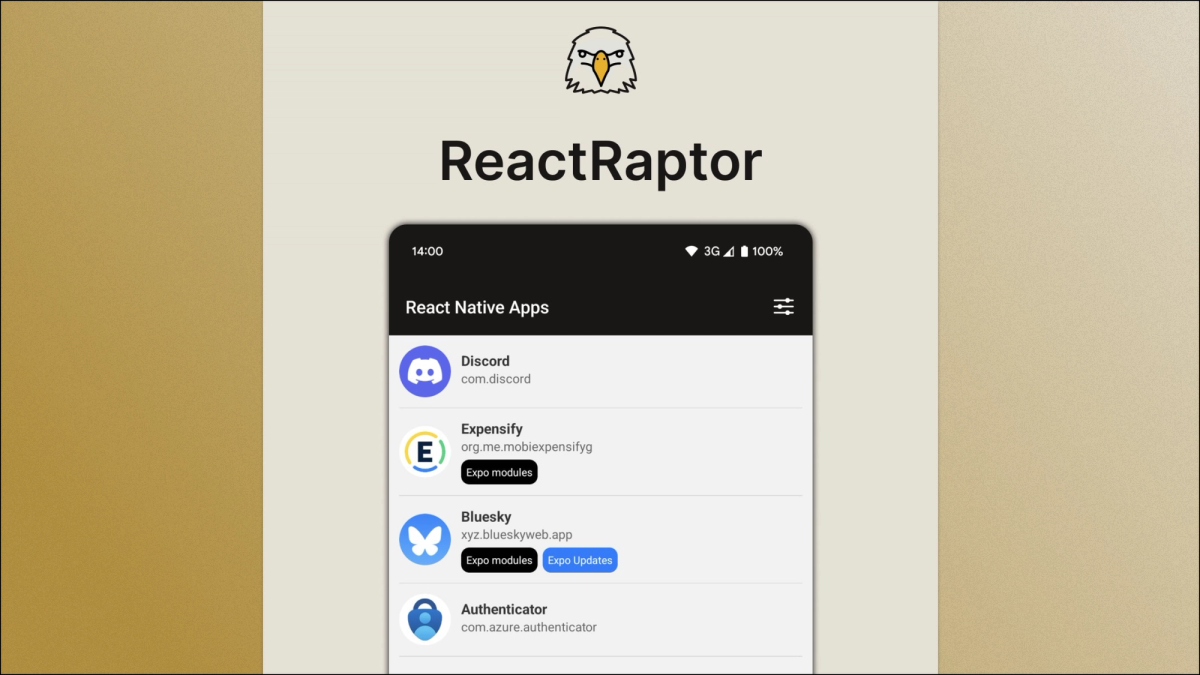
Ever wanted to know if an app on your phone was made with React Native and Expo? Those of you with Android devices can do it now with ReactRaptor.
ReactRaptor scans every app on your Android phone, opens each APK, and looks at the assets and native libraries inside (like index.android.bundle). From that, it figures out whether the app uses React Native, Expo and Expo Updates. In this article I’ll share why I built ReactRaptor and how it works.
Why I built ReactRaptor
From a young age I’ve always been curious how certain technologies were made. From disassembling and reassembling old computers to inspecting the source code of websites. I’ve felt the same curiosity about mobile apps. The journey into app development began with Cordova, followed by Ionic. After a short period of working with Flutter, React Native became my preferred framework. Tools like LibChecker provide technical details about libraries, but lack specific functionality for identifying React Native.
I saw a gap I wanted to fill, and started working on it.
How ReactRaptor Works
Expo Modules
I began developing ReactRaptor with limited Kotlin experience, just enough to create a simple Expo Module for displaying native Android Dialogs.
Getting started with adding native code to an Expo project can be as easy as running:
And you have a module that’s instantly usable in your app. You can learn more about using Expo Modules here: https://docs.expo.dev/modules/overview/
During the prototyping phase, I relied on Cursor and Claude for the Kotlin code. I knew what the code needed to do and roughly how it should look. I just didn’t know all the Android API’s and Kotlin syntaxes that go along with it. AI tools can be a great way to fill in those gaps. This enables React developers to further explore the capabilities of the native platforms.
Permission
To be able to get a list of installed apps, you first need to declare QUERY_ALL_PACKAGES permission. This permission lets your app retrieve information about other installed applications. You can declare it in the Expo Module like this:
However, Google has strict guidelines for the usage of this permission. Apps requesting QUERY_ALL_PACKAGES must have a core functionality that depends on querying installed apps. When submitting the app for review, you will also need to justify why your app needs this permission.
APK anatomy
An Android app consists of these components:
APK: This is the main application, it’s compressed and contains all the necessary compiled code to run the app. It also contains resources like images, AndroidManifest.xml and most importantly the “index.android.bundle" file.
Native Libraries: This is compiled code, mostly C++/C libraries and not Java/Kotlin. These files are extracted from the APK mostly for performance reasons.
App Data: This is private data, like: shared preferences, SQLite databases, caches etc
With this understanding of APK structure, detecting React Native or Expo implementation becomes straightforward. The presence of specific libraries and files serves as reliable indicators. For example these are the Native Libraries included in the ReactRaptor app:
You can probably already spot some familiar libraries. Expo apps for example always ship with libexpo-modules-core. But you can also spot amazing community libraries such as Reanimated, React Native Screens and react-native-mmkv.
Let's take a look at how this can be achieved in Kotlin (semi realistic code):
First, locate the APK; you can use the PackageManager to get the application path:
Once you have the path, use the ZipFile class to iterate through the contents of an APK:
The above code will give us access to all the files in the APK. That means we can actually check if these files are included:
- lib/arm64-v8a/libreactnative.so: This is generated by React Native.
- lib/arm64-v8a/libappmodules.so: This is generated by React Native but only when the New Architecture is enabled.
- assets/index.android.bundle: This is the actual JavaScript bundle. In most cases this is actually Hermes bytecode, so it isn’t human-readable.
- assets/app.config: This is the Expo Config of the app. In your expo app you can also access this through Constants.expoConfig.
Based on these files, we have a good indication as to what extent an app uses React Native and Expo.
Coroutines
I’m by no means an expert when it comes to Kotlin so naturally I ran into some issues. One of these is that animations would freeze when analyzing a list of apps. Iterating through every APK, unzipping it and finding the right files takes some time. This is quite a CPU intensive operation. In my first prototype this was a thread. While looking through the source code of Expo I noticed the usage of coroutines in the Kotlin code. Applying this pattern solved my thread blocking issue. A basic example using Expo Modules:
Using TanStack Query to call Expo Modules
TanStack query is commonly used to fetch data from APIs, but it’s actually an async state manager. In ReactRaptor, I used TanStack Query to manage async function calls to my Expo Module.
This is an example on how you can call an Expo Module AsyncFunction:
Using a hook like this gives you useful features like caching, loading and error states and a retry mechanism.
Android apps built with Expo
There are a lot of apps that are using React Native and Expo. Some apps only use React Native for some screens, other apps use Expo Modules but don’t use the Expo CLI. React Native usage can therefore be seen as a scale. You can use React Native for just one screen in a big app but you can also fully leverage Expo for the best developer experience.
I want to highlight a few exciting apps that I found during the development of ReactRaptor:
Expo Apps:
- Coinbase
- Kick
- Amazon Fire TV App
- Tesla
Apps using Expo Modules:
- Steam (uses Expo Modules)
- Untappd (uses Expo Modules)
React Native Apps:
- Discord
- HelloFresh
- Amazon (partly)
- Outlook (partly)
- Facebook (partly)
For all of these apps, remember that detecting the usage of React Native and/or Expo doesn’t mean the whole app is built using it.
Wrapping up
If you are also curious which apps on your Android device are powered by Expo? Download ReactRaptor from the Google Play store and let us know what you’ve discovered!
If you are interested to see the source code for yourself, you can take a look at the Github repositories:
- ReactRaptor: https://github.com/LeonDvlpmnt/react-raptor
- expo-android-app-list module: https://github.com/LeonDvlpmnt/expo-android-app-list
And if you'd like to see iOS apps using Expo check out this blog from Evan Bacon.